
Are You Using Gumroad's Most Overlooked Feature? (Hint: Email Workflows)
Discover how Gumroad's built-in email workflows let solopreneurs automate email sequences without extra tools.

Access your FREE Solopreneur Success Hub - your subscribers-only comprehensive command center for building and scaling a successful one-person business.
I created this all-in-one toolkit for building a profitable one-person business, something I wish existed when I first started, and it saves me 20+ hours a week.
Now, it’s yours… FREE!
More information about the Hub here.
Most creators duct-tape three or four tools together just to send a few automated emails.
They connect their checkout platform to n8n or Make, then to ConvertKit, then wonder why half their sequences break at 2 a.m.
Did you know:
Gumroad quietly gives you email workflows built right into the checkout?
No extra subscriptions.
No API glue.
No late-night debugging.
If you sell digital products, memberships, or even email courses, Gumroad Workflows might be the most underrated feature hiding in plain sight.
In this post, I’ll break down exactly what they do, how to set them up, and when they’re “good enough” versus when you should graduate to a dedicated email platform.

What Gumroad Workflows Actually Do
At its core, a Gumroad Workflow is an automated email sequence triggered by a specific action.
You pick a trigger.
Gumroad sends the emails.
That’s it.
Available triggers include:
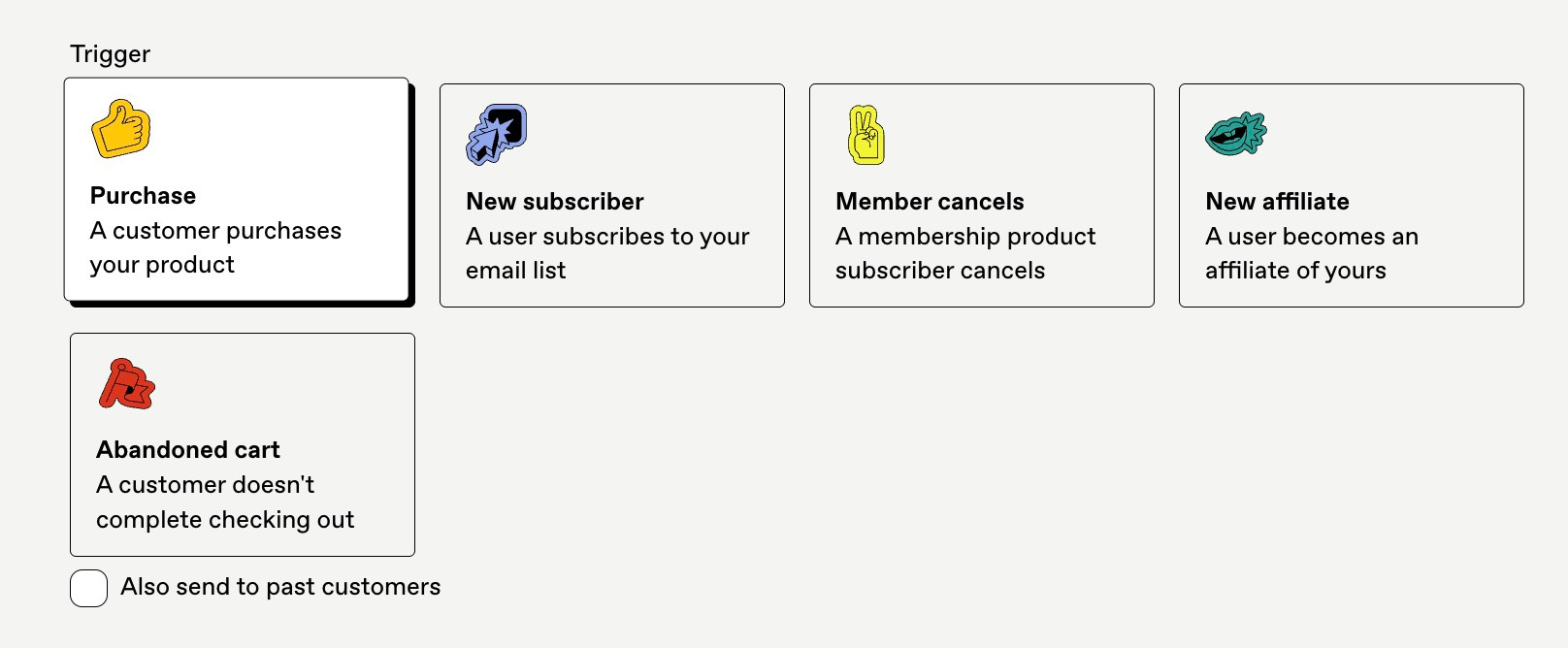
New purchase — someone buys your product
New subscriber — someone joins your free email list
Member cancels — a membership subscriber cancels their subscription
New affiliate — someone signs up to promote your product
Abandoned cart — someone adds to cart but doesn’t complete checkout
Once the trigger fires, Gumroad delivers your pre-written emails on a schedule you define.
You control the delays (hours, days, weeks, or months) and the content of each message.
Main use cases for solo creators:
Drip courses or onboarding sequences that teach buyers how to use your product
Post-purchase “wow” series that build trust and reduce refunds
Churn surveys or win-back emails after membership cancellations
Abandoned cart reminders that recover lost sales
Simple nurture sequences for free subscribers before you pitch
For a one-person business, this covers 80% of the automation you actually need.
I use Gumroad for 100% of my email workflows!
Inside the Workflow Builder: How It Works
Setting up a workflow takes about five minutes.
Step 1: Create a New Workflow
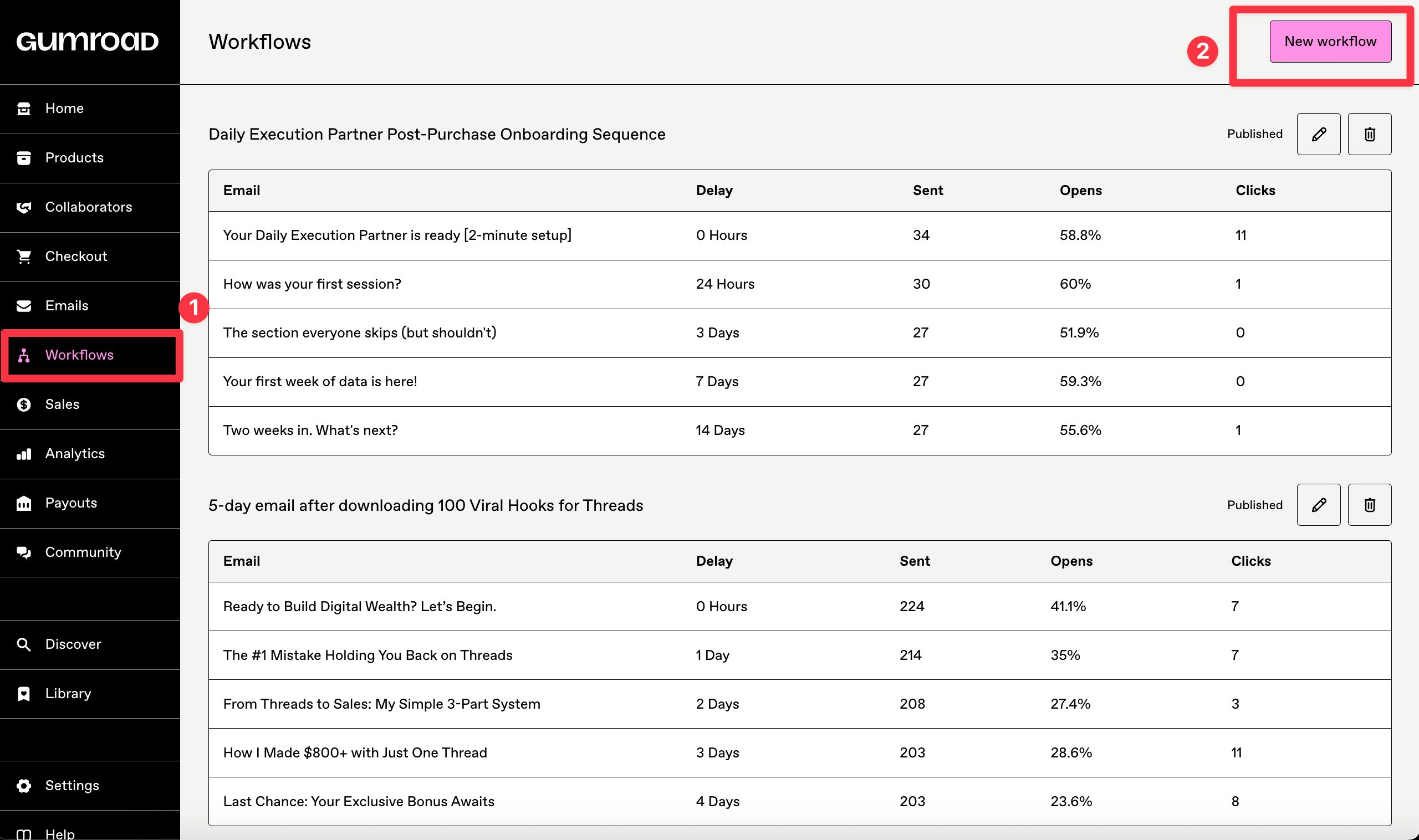
Log into your Gumroad dashboard
Navigate to Workflows
Click “New workflow”
Give it a name (e.g., “Product A Welcome Sequence”)
Choose your trigger from the dropdown
Step 2: Define Your Audience Filters
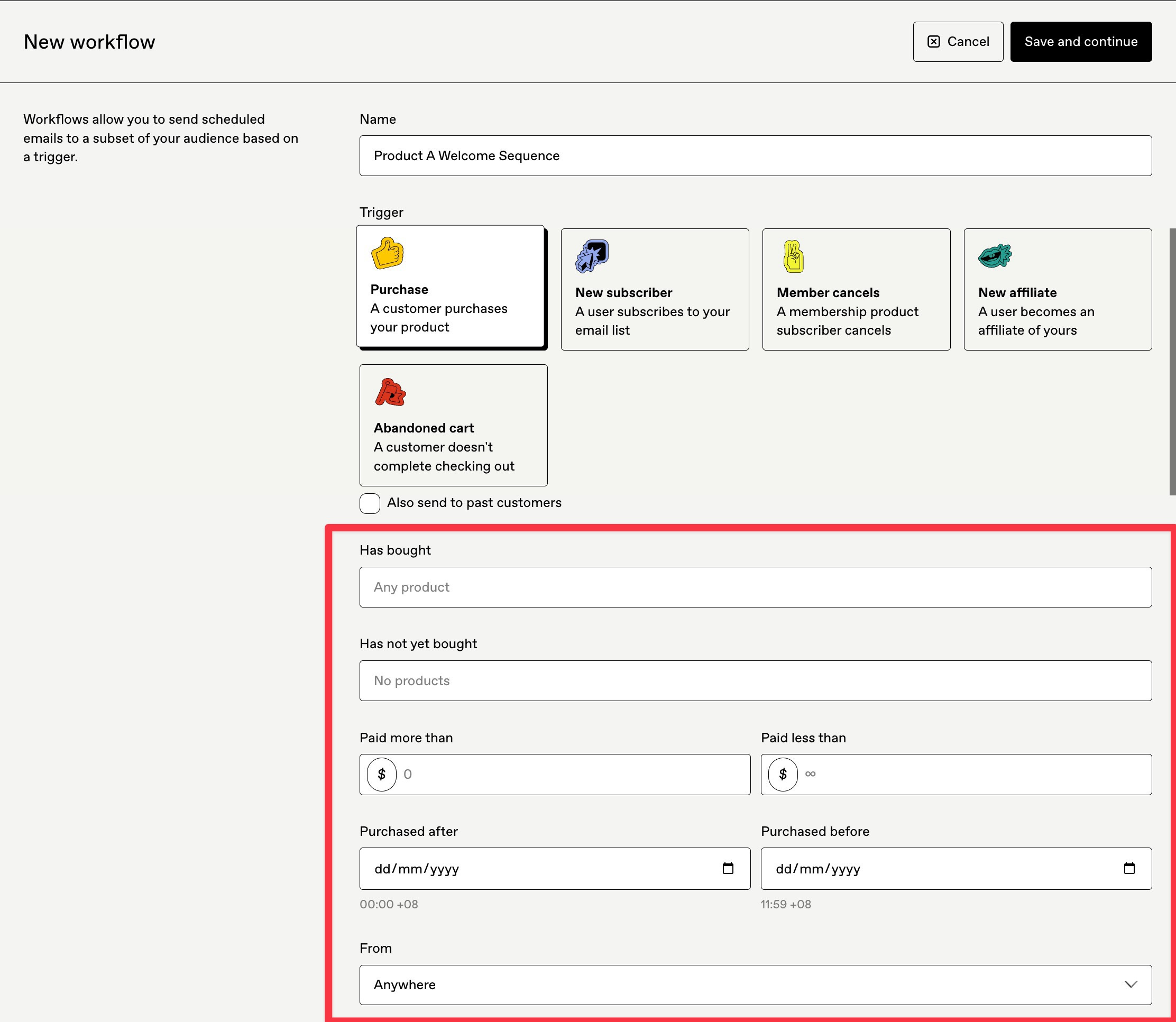
Gumroad lets you filter who enters the workflow based on:
Specific product - only buyers of a particular item
Has bought - filter by what product(s) they bought
Has not yet bought - filter by what product(s) they have not bought
Amount paid - useful for tiered pricing
Date range - limit to purchases after a certain date (Purchased after and/or Purchased before)
From - Filter by countries
This filtering means you can create different sequences for different products without building separate funnels.
Step 3: Add Your Emails
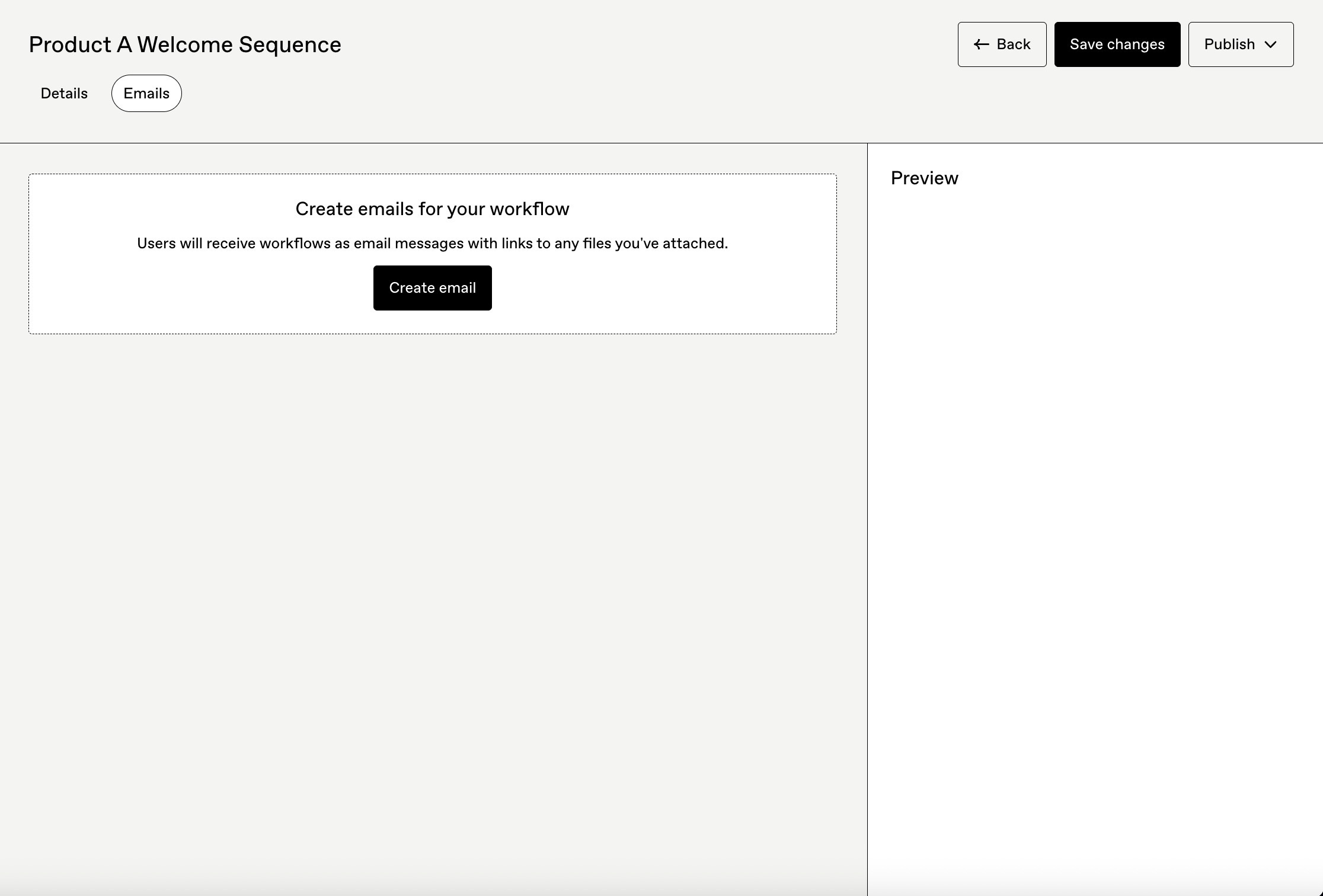
Inside the workflow, click “Create email” to add each message.
For each email, you’ll set:
Delay - when to send (e.g., “0 hours” for instant, “3 days” for follow-up)
Subject line - keep it short and curiosity-driven
Body content - plain text or basic formatting
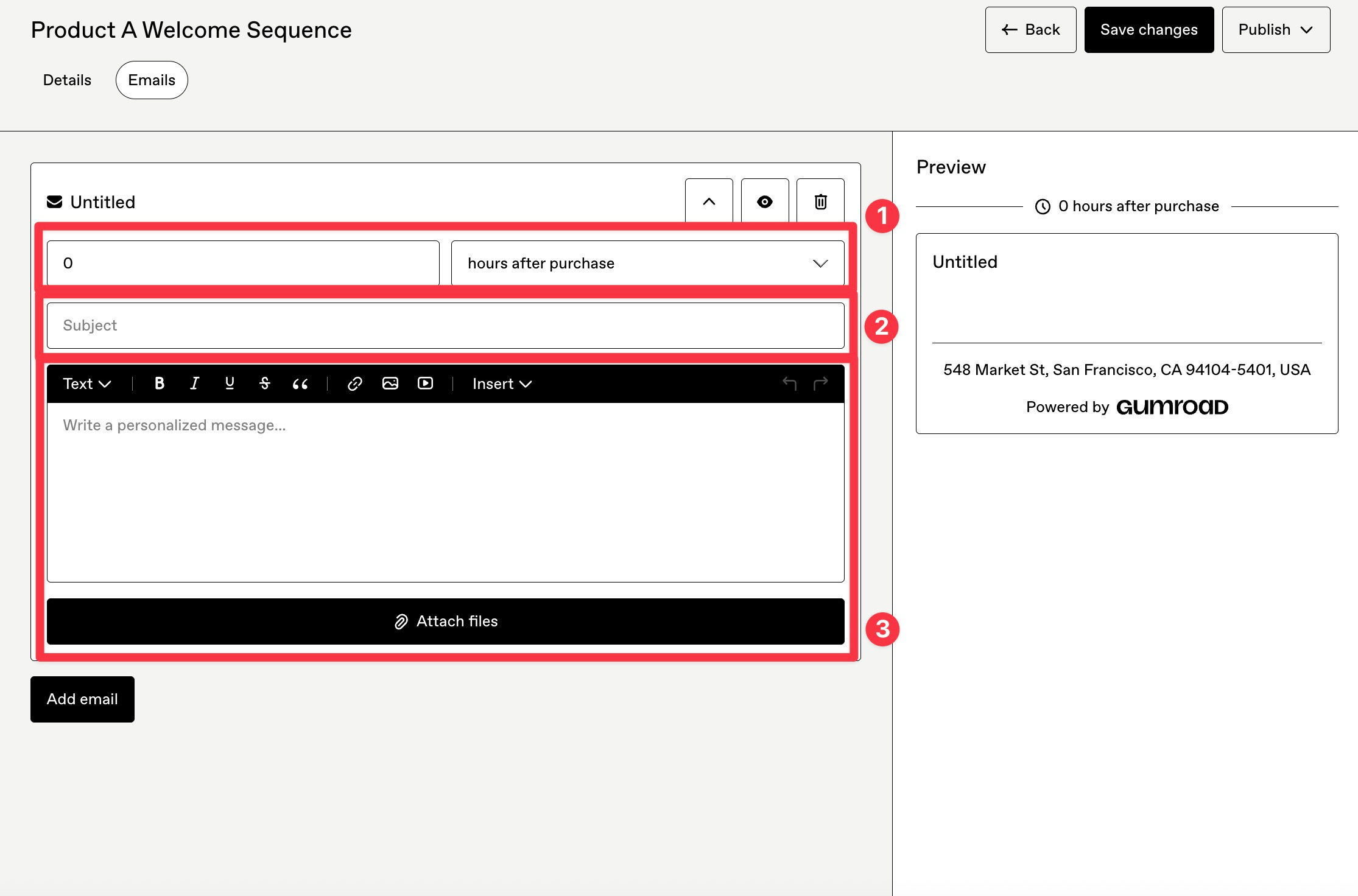
Pro tip: Start each sequence with a “0 hours” email. This is your instant confirmation that builds trust immediately after purchase.
Step 4: Preview, Publish, Edit
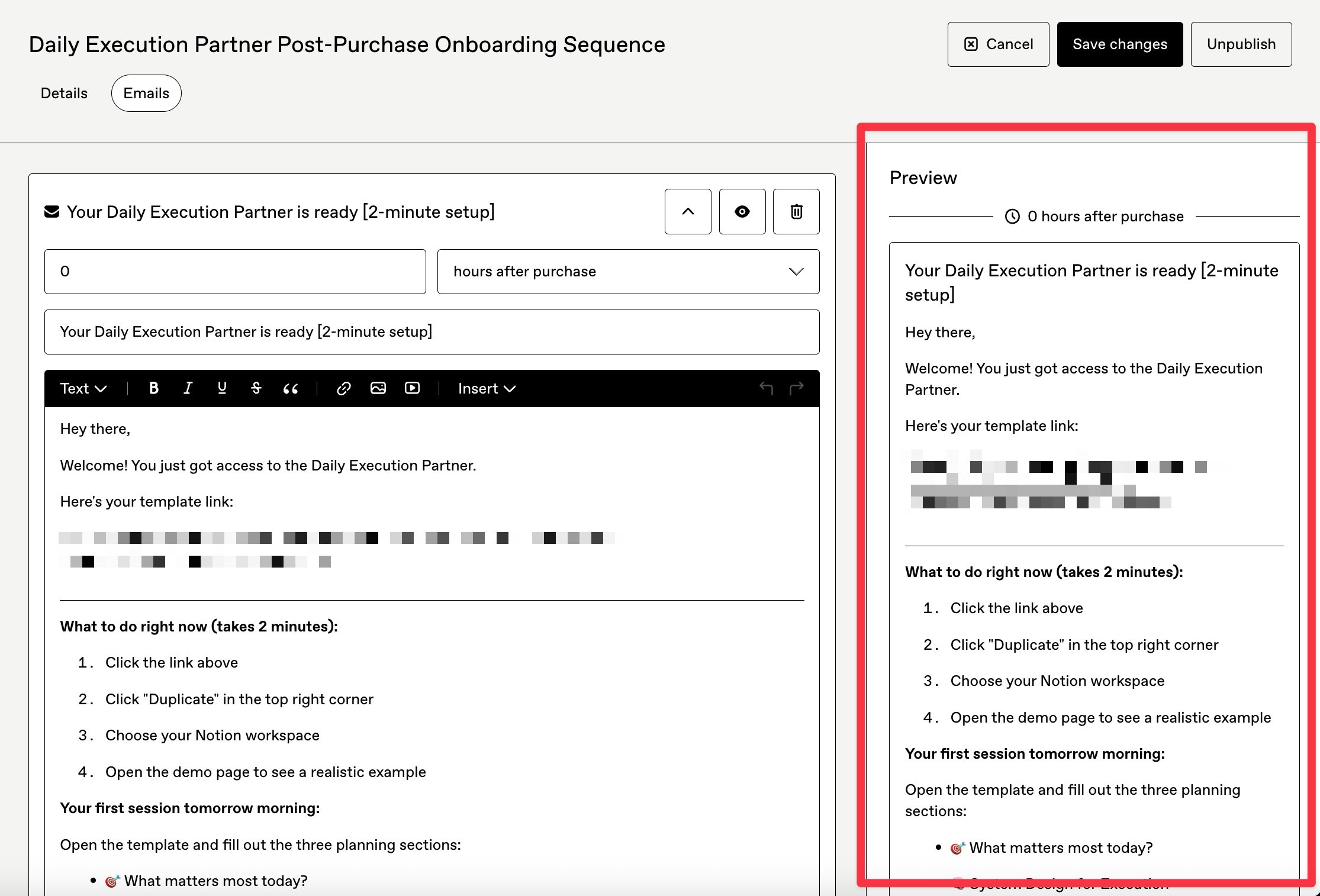
Before publishing, use the preview function to check how your email looks.
Once live, you can still edit the email content.
However, some workflow-level settings (like the trigger type) can’t be changed after publishing.
If you need structural changes, you’ll have to clone the workflow and rebuild. This is the painful part. More on that later.
Practical Workflow Examples for Solopreneurs
Let me share three workflows I actually use. Feel free to steal these.
Example 1: Product Welcome + Success Path
This is my default sequence for any paid digital product.
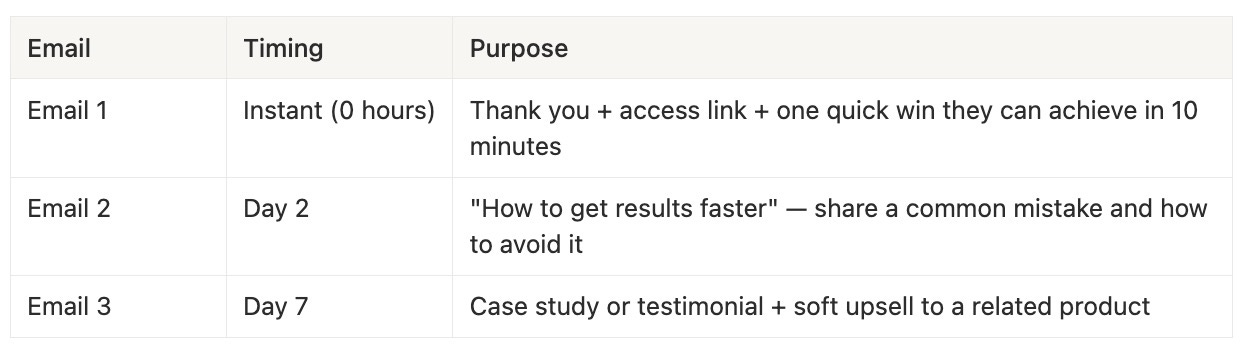
Why it works: The instant email confirms their purchase and gives them momentum. The Day 2 email prevents buyer’s remorse by showing progress. The Day 7 email builds social proof when they’re most engaged.
Example 2: Free Subscriber Nurture
For people who join my email list but haven’t bought yet.
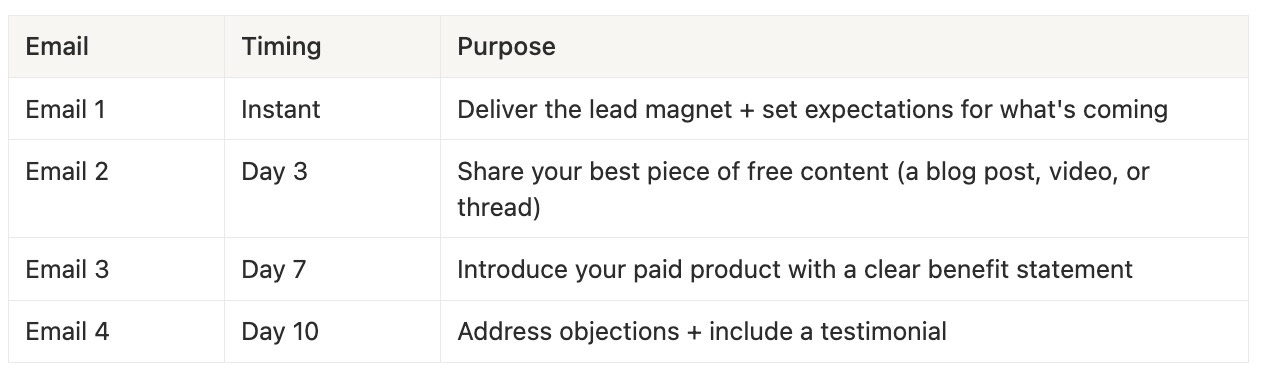
Why it works: You’re building trust before asking for money. By Day 10, they know who you are, what you stand for, and why your product might help them.
Coming up with an email sequence sounds hard?
Here’s a powerful prompt you can use to create high-converting nurturing email sequences.
It’s a structured meta-prompt that helps design a strategic, multi-email lead nurturing sequence that guides prospects from awareness to conversion in a clear, step-by-step way.
Just copy and paste onto your best LLMs and let the AI do all the heavy-lifting.
Here’s the Prompt:
Act like an expert lifecycle marketer and senior copywriter who specializes in high-converting lead nurturing email sequences.

OBJECTIVE:
Your goal is to design a complete, strategic lead nurturing email sequence that builds trust, educates prospects, overcomes objections, and smoothly moves leads toward a conversion (demo, purchase, call booking, or reply).

Before writing any emails, you MUST gather all required context by asking the user the questions listed below. Do not assume or invent missing details.

STEP 1: CONTEXT COLLECTION (ASK THESE QUESTIONS FIRST, ONE QUESTION AT A TIME)
Ask the user to clearly answer each of the following:

1. Product / Offer
- What is the product or service?
- Is it B2B, B2C, SaaS, course, coaching, ecommerce, or something else?
- What is the primary conversion goal of this email sequence?

2. Audience
- Who is the target audience? (job title, industry, demographics, sophistication level)
- What problem or pain point brought them onto the list?
- What level of awareness are they at? (unaware, problem-aware, solution-aware, product-aware)

3. Sequence Structure
- How many total days should this sequence run?
- How many emails should be sent?
- Should emails be sent daily, every other day, or on a custom schedule?

4. Brand & Voice
- Desired tone (e.g., friendly, authoritative, conversational, premium, edgy)?
- Any brands, creators, or writing styles to model?
- First-person (“I/we”) or brand voice?

5. Messaging & Constraints
- Core value proposition or unique angle
- Objections or hesitations to address
- Compliance requirements (CAN-SPAM, medical/legal disclaimers, etc.)
- Words, phrases, or topics to avoid (if any)

6. CTA & Funnel
- Primary CTA for each email (reply, click, book, buy, read, watch)
- Destination of clicks (sales page, calendar, content, checkout)
- Warm-up vs sales-heavy preference (soft → hard sell, or balanced)

STEP 2: STRATEGY DESIGN
Once the user provides answers:
- Map the emotional and logical journey of the lead across the sequence
- Assign a clear purpose to each email (trust, education, authority, objection handling, urgency)
- Define a narrative arc that progresses naturally from email to email

STEP 3: EMAIL CREATION
For each email in the sequence, produce:
- Email number + day
- Subject line (include 2–3 variations)
- Preview text
- Full email body (short paragraphs, skimmable formatting)
- Primary CTA
- Psychological trigger used (e.g., curiosity, authority, social proof, scarcity)

STEP 4: QUALITY CONTROL
Before finalizing:
- Ensure no repetition across emails
- Confirm tone consistency
- Verify each email advances the reader toward conversion
- Optimize for clarity, persuasion, and engagement

OUTPUT FORMAT:
- Use clear headings for each email
- Use bullet points where helpful
- Write in polished, conversion-focused marketing language
- Be thorough and detailed

IMPORTANT:
Do NOT write the emails until the user has answered the context questions in Step 1.

Take a deep breath and work on this step-by-step.
Example 3: Abandoned Cart Recovery
This one is pure revenue recovery.
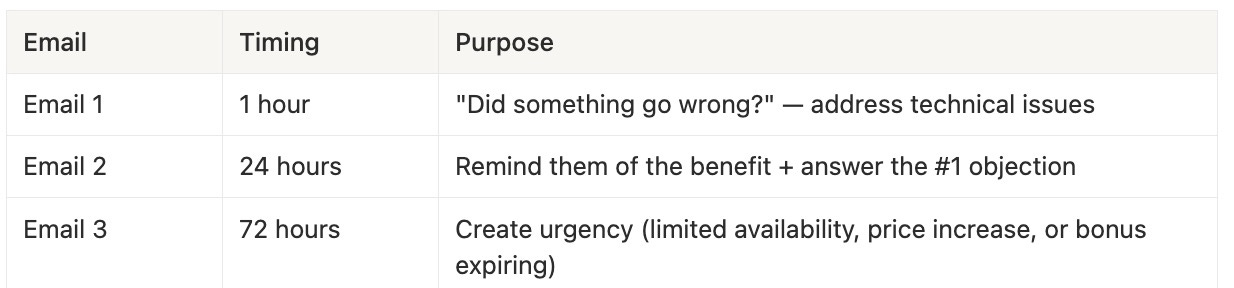
Why it works: Most abandoned carts are due to distraction, not rejection. A gentle reminder at the right time recovers sales you would have lost.
Need more help?
Here’s 66 complete email sequences. 180+ proven emails. 5 business models.
All done for you.
Just plug and ready to deploy immediately!

The Tradeoffs: When Gumroad Workflows Are Enough (and When They’re Not)
Let’s be honest about what you’re getting and what you’re giving up.
Advantages for One-Person Businesses
Everything is native. No Make or n8n. No API credentials. No third-party login. You set it up once and it runs.
Triggered by real events. Unlike generic email platforms, Gumroad Workflows fire based on actual purchase and subscription data. This means fewer broken automations.
“Good enough” segmentation. You can filter by product, amount paid, and date. For most solopreneurs, this covers the basics.
Zero extra cost. Workflows are included in Gumroad’s standard fees. You’re not paying for another email tool.
Limitations to Be Honest About
Less advanced than dedicated Email Service Providers (ESPs). If you need visual automation builders, conditional branching (if/then logic), or deep analytics, you won’t find them here.
Limited design options. Gumroad emails are plain and simple. You can’t drag-and-drop fancy templates.
Structural changes require rebuilding. Once you publish a workflow, you can’t change the trigger or filters. You’d need to clone and recreate.
No advanced segmentation. You can’t tag subscribers based on behavior or build complex audience segments. Oh, there’s no personalisation for the emails as well.
My Point of View: Who Should Use What
Stick with Gumroad Workflows if:
You’re selling 1-5 digital products
You want “set it and forget it” automations
You value simplicity over customization
Your email list is under 10,000 subscribers
Graduate to a dedicated email platform if:
You need conditional logic (e.g., “if they clicked, send this; if not, send that”)
You want detailed analytics on opens, clicks, and conversions
You’re building complex funnels with multiple entry points
Your email list is growing fast and you need advanced segmentation
When you do graduate, you can still use Gumroad for purchases and connect it to ConvertKit, Mailchimp, or Beehiiv via n8n or Make.
But don’t rush there.
Most solopreneurs overcomplicate their email setup long before they need to.
Frequently Asked Questions
1. Can I use Gumroad Workflows without selling anything?
Yes. You can trigger workflows from “New subscriber” events. This lets you build a free email list and nurture them with automated sequences, even before you have a product to sell.
2. How many emails can I add to a single workflow?
There’s no hard limit. However, I recommend keeping sequences between 3-7 emails for most of the products. Longer sequences tend to have diminishing returns and are harder to maintain. I had one sequence with 20 emails and it was quite a nightmare trying to analyse and troubleshoot that.
3. Can I A/B test subject lines in Gumroad Workflows?
Not natively. Gumroad doesn’t have built-in A/B testing. If testing is critical to your strategy, you’d need a dedicated email platform.
4. What happens if someone triggers a workflow twice?
If the same person meets the trigger conditions again (e.g., buys the same product twice), they’ll re-enter the workflow. Be mindful of this when designing your sequences.
5. Can I see analytics for my workflow emails?
Gumroad provides basic open rates and click rates. You won’t get the depth of analytics that ConvertKit or Mailchimp offer, but you’ll know if your emails are being read.
Final Thoughts
Gumroad Workflows aren’t flashy.
They don’t have visual builders or AI-powered optimization.
But they work.
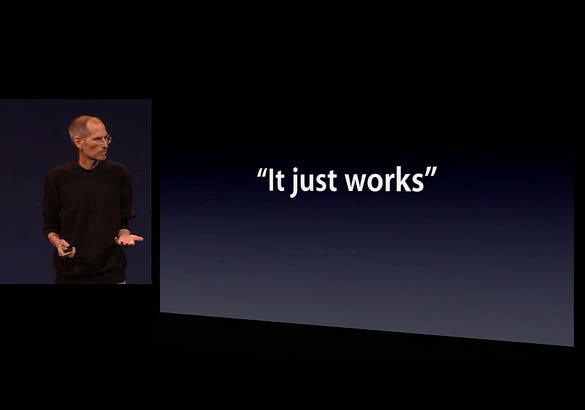
For solopreneurs who want to automate their post-purchase experience, nurture free subscribers, and recover abandoned carts, Gumroad Workflows handle the job with zero extra tools.
Your Next Step!
Pick one workflow from this post or the ones in my Email Marketing Accelerator Kit and set it up today.
Start with the Product Welcome sequence if you already have a product, or the Free Subscriber Nurture if you’re building your list.
You don’t need a complex funnel.
You need one automated sequence that runs while you sleep.
Not a paid member yet?
Upgrade now and unlock the Premium Vault.
Get instant access to systems, prompts, challenges, frameworks, AI tools, and resources worth thousands.
See the full benefits of becoming a paid subscriber below.
Your future self will thank you.


Email has an ability many channels don’t: creating valuable, personal touches - at scale. - David Newman
Interesting Substack Posts I Read This Week:
10 Mistakes I Won’t Repeat On Substack In 2026 by Karo (Product with Attitude)
I Built an AI Tool That Tells Me Why My Offers Don’t Sell (And How You Can Too) by Sharyph
How To Actually Achieve Your Goals in 2026 (With AI) by Sabrina Ramonov 🍄
Notion AI: How You Can Change Notes into Workflow by Creators AI
Substack Sections Explained: A Practical Guide to Structuring Your Publication by Casandra Campbell
The Substack Rules Changed. Here’s Your 2026 Playbook by Claudia Faith
Are You Wasting NotebookLM’s Superpowers? 9 Hidden Features That Could 10x Your Productivity! 🤔🚀 by AI & Agents
The 2026 Playbook: Six Questions That Force Execution by The AI Leadership Edge and Raffaela Rein
The Most Important Post in Your Substack: Your “Hero Post” by Veronica Llorca-Smith
ANALYSIS: What Meta’s $2B Manus Buy Signals for Leaders in 2026 by Joel Salinas and Farida Khalaf
I’ve also just launch the First Digital Dollar Project to showcase how 20 solopreneurs with different products, different offers, different strategies, different paths earn their first digital dollars., check it out:
Thanks for reading! Ready for the next step?
Let’s crack the growth equation and build a thriving one-person business on your terms!
Anfernee
Figuring out Gumroad's email feature has been on my list so thank you!
This was such a refreshing breakdown of “good enough” automation for solo creators.
Love how you were being honest about the tradeoffs and clearly drew the line between when Gumroad is enough and when to graduate to a full ESP.