
Solopreneur OS for Claude [Product Guide and Setup Instructions (v1.0.0)]
By Anfernee Tan, Solopreneur Code

This is the User Setup Guide for Solopreneur OS for Claude. Details of the product can be found here. You can also download the entire resource here.

Part 1: Product Description
What This Is
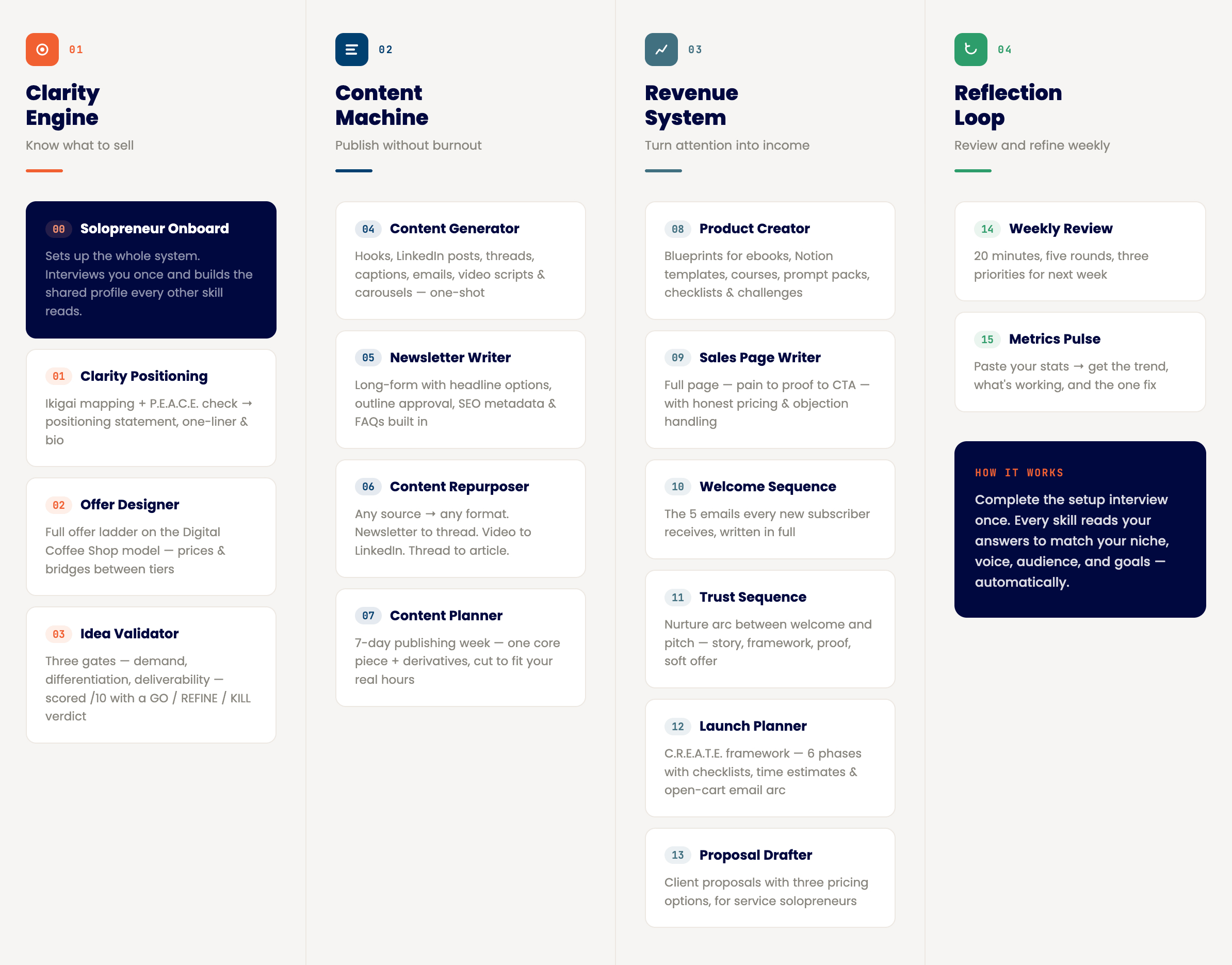
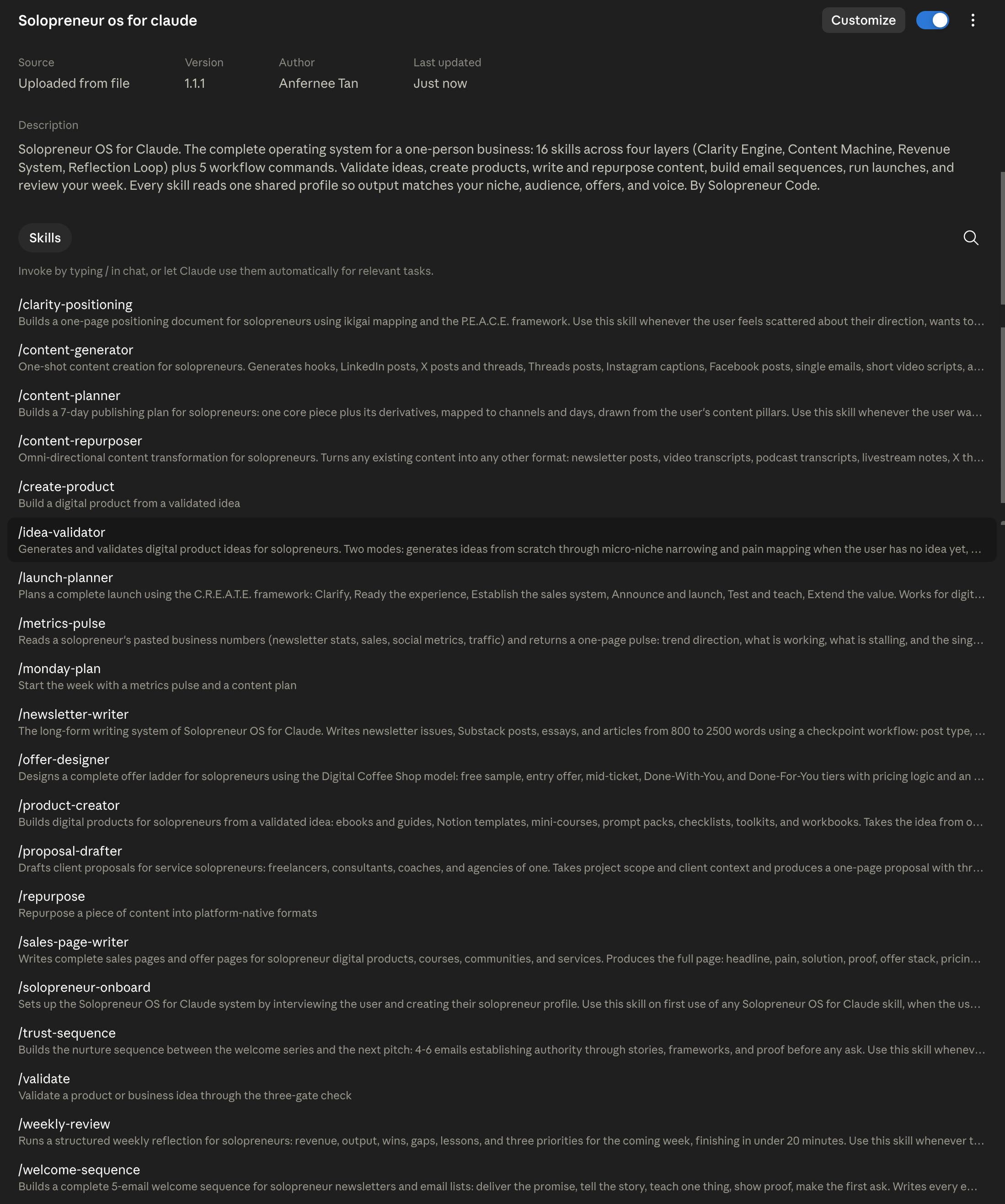
Solopreneur OS for Claude turns Claude into the operating system of your one-person business. It is a set of 16 skills, organized into the four layers every solopreneur business runs on, plus 5 workflow commands and a setup system teaching Claude your specific business.
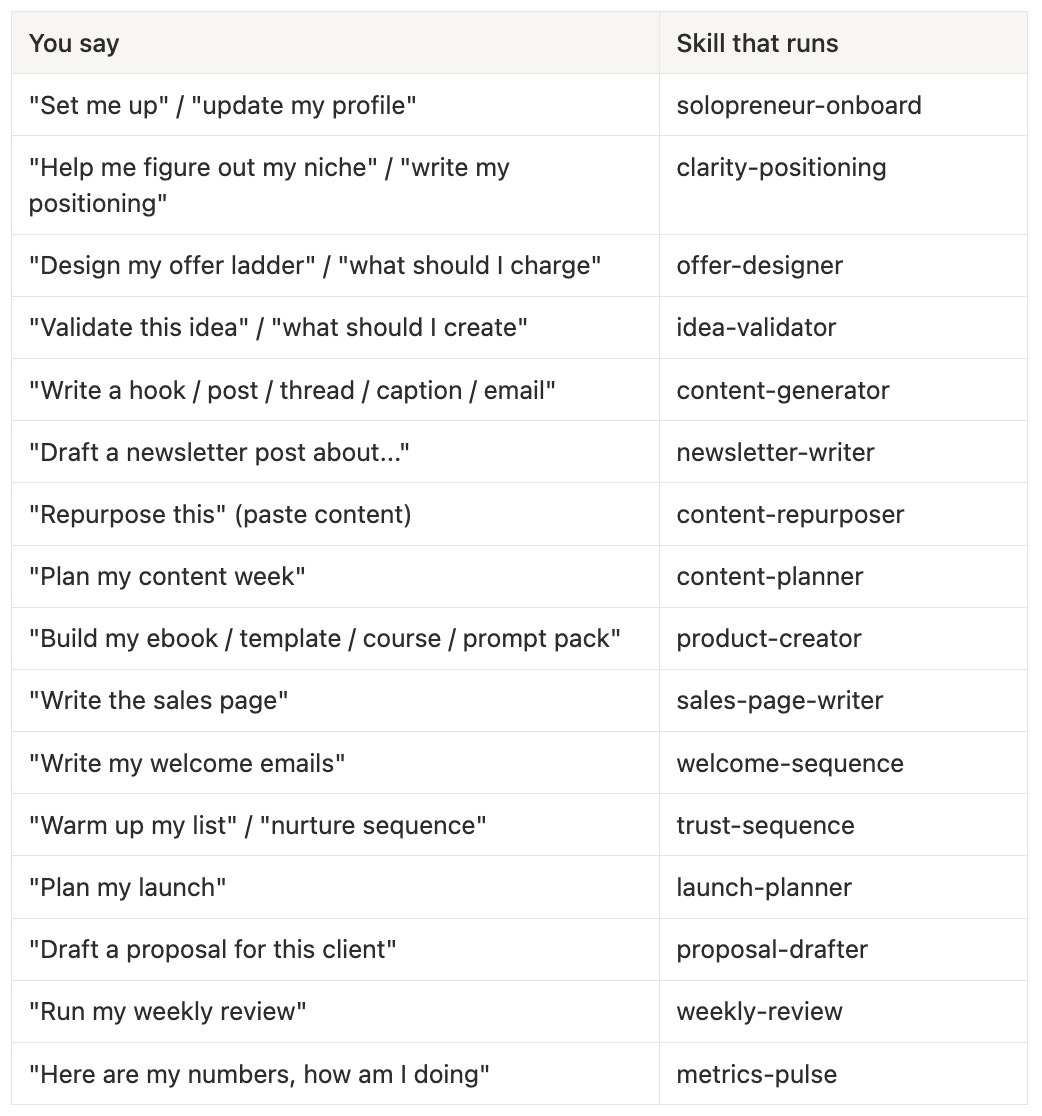
A skill is an instruction set Claude loads automatically when your request matches its job. You don’t memorize commands or prompts. You say “validate this idea” or “plan my content week” in plain language, and the right skill activates with the right method.
What makes this different from a prompt library: the skills share one brain. During setup, Claude interviews you once and writes a profile covering your niche, audience, offers, voice rules, and 90-day goal. Every skill reads this profile before producing anything. The sales page knows what the validator scored. The content planner knows what your metrics said. You explain your business one time.
Who It Is For
Solopreneurs, freelancers, creators, coaches, and consultants running (or starting) a one-person business, on any Claude plan, including Free.
No technical background needed. If you can upload a file, you can install this.
The Four Layers and 16 Skills
Clarity Engine: know what to sell
solopreneur-onboard sets up the whole system. One interview, one profile, a tour of the pack, and a suggested first step based on your stage.
clarity-positioning maps your ikigai, runs the P.E.A.C.E. alignment check, and produces a one-page positioning doc with your statement, one-liner, and bio.
offer-designer builds your offer ladder on the Digital Coffee Shop model: free sample, entry, mid-ticket, Done-With-You, Done-For-You, with prices and the bridges between tiers.
idea-validator works two ways. No idea yet: it narrows you to a micro-niche, maps ten frustrations, and surfaces candidates. Idea in hand: it scores demand, differentiation, and deliverability out of 10 and returns a GO, REFINE, or KILL verdict with next steps.
Content Machine: publish without burnout
content-generator is the one-shot engine: hooks (10 types), LinkedIn posts, X posts and threads, Threads posts, captions, single emails, video scripts, and carousel outlines, each following platform rules.
newsletter-writer handles long-form with checkpoints: post type, three headlines, SEO keywords, and an outline for your approval, then the full 800-2,500 word draft with metadata, FAQs, and image concepts.
content-repurposer transforms in any direction. Newsletter to thread. Video transcript to LinkedIn posts. Thread to article. Workshop notes to lead magnet. Seven source types, nine targets, with conversion rules per pairing.
content-planner builds your 7-day publishing week: one core piece, its derivatives, channels, days, and a daily engagement block, cut to fit the hours you actually have.
Revenue System: turn attention into income
product-creator builds the product itself, with blueprints for ebooks, Notion templates, mini-courses, prompt packs, checklists, and 7-30 day challenges. Skeleton approval first, then content in batches, then packaging.
sales-page-writer writes the full page: pain, mechanism, proof, offer stack, honest pricing presentation, objection FAQ, and CTA, sized to your price tier.
welcome-sequence writes the 5 emails every new subscriber receives: deliver, story, teach, proof, ask, on a 0-1-3-5-7 day cadence, with platform setup notes.
trust-sequence writes the nurture arc between welcome and pitch: belief shift, framework, mistake, proof, soft offer. Runs as new-subscriber continuation or pre-launch warm-up.
launch-planner plans your launch on the C.R.E.A.T.E. framework: six phases with checklists, honest time estimates, the open-cart email arc, and a five-item go/no-go list before any cart opens.
proposal-drafter writes client proposals for service work: one page, three pricing options, countable deliverables, clear terms, plus the cover email.
Reflection Loop: review and refine weekly
weekly-review runs your 20-minute weekly ritual: scoreboard, output, wins and gaps, the lesson, then exactly three priorities for next week.
metrics-pulse reads your pasted numbers (newsletter, sales, social, traffic) and returns one page: trend, what’s working, what’s stalling, and the single fix for the week.
The 5 Commands
Shortcuts for the highest-frequency workflows. Available in Claude Code. On Claude.ai, say the phrase instead:
/monday-plan runs metrics-pulse then content-planner, feeding what’s working into the week’s plan
/weekly-review runs the weekly ritual
/validate runs an idea through the three gates
/create-product starts a product build
/repurpose multiplies a finished piece
Built-In Protections
Every skill enforces rules protecting your brand:
Your voice rules from the profile apply everywhere, including your banned words
No fabricated stories, testimonials, statistics, or results. Where your real material belongs, the skill asks for it or marks a placeholder.
No fake urgency or invented scarcity in any sales material
Honest verdicts. The validator kills weak ideas. The pulse calls a flat month flat.
Part 2: What’s in the Package
solopreneur-os-for-claude-plugin.zip     The plugin (Claude Code and Cowork)
└── solopreneur-os-for-claude/
    ├── .claude-plugin/plugin.json       Plugin manifest
    ├── README.md                        Quick reference
    ├── commands/                        The 5 slash commands
    └── skills/                          All 16 skills

solopreneur-os-skills-bundle.zip         The Claude.ai versions
└── 16 individual .zip files, one per skill (unzip the bundle first,
    then upload each skill zip separately, see Setup A)

This guide (solopreneur-os-for-claude-guide.md / .pdf)
Requirements
Claude.ai (web, desktop, or mobile): any plan, including Free. Custom skills need code execution enabled (covered in setup below). Free comes with lower usage limits. Pro, Max, Team, and Enterprise raise or remove them.
Claude Code: the command-line or desktop coding tool, any plan with Claude Code access.
Claude Cowork: the agentic desktop app, where the same uploaded skills apply. Requires a paid plan (Pro, Max, Team, or Enterprise).
You need only ONE of these.
Most subscribers use Claude.ai. Follow Setup A and skip the rest.
I personally use with Cowork.
Part 3: Setup Guide
Setup A: Claude.ai (most users start here)
Step 1. Turn on the required capabilities.
Open claude.ai and sign in
Click your initials (bottom-left on web), then Settings
Open Capabilities (sometimes shown under Features)
Turn ON “Code execution” and “File creation”
Step 2. Upload the skills.
Unzip solopreneur-os-skills-bundle.zip. You get 16 individual skill zips (solopreneur-onboard.zip, content-generator.zip, and so on).
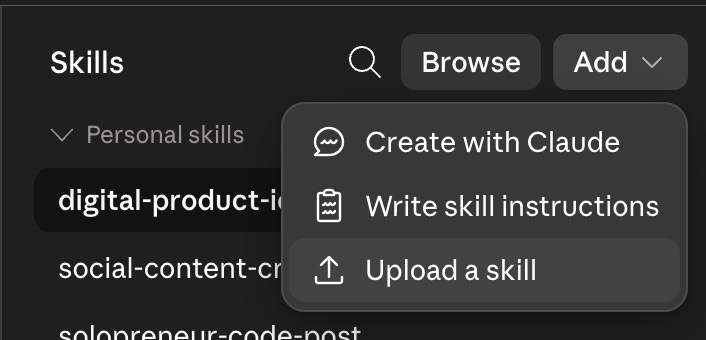
In Settings, open Customize, then Skills
Click the “Add” button, then choose to “Upload a skill”
Select ONE of the 16 skill zips (for example, solopreneur-onboard.zip)
Wait for the confirmation, then repeat for each skill
Upload all 16, or start with these five and add the rest later: solopreneur-onboard, content-generator, newsletter-writer, content-repurposer, idea-validator.
Each uploaded skill shows a toggle. Leave them ON.
Step 3. Create your home base.
Create a new Project (left sidebar) named “Solopreneur HQ”
You’ll add your profile to it in Part 4 below
Run your business chats inside this Project so every skill finds your profile
Notes:
Skills upload to YOUR account. They don’t transfer to others. Each subscriber installs their own copy.
If the upload rejects a file, confirm it ends in .zip and you selected the file, not the folder.
Exact menu names occasionally move between updates. Current instructions live at https://support.claude.com (search “skills”).
Setup B: Claude Code
Copy into your skills folder (recommended)
Unzip solopreneur-os-for-claude-plugin.zip
Copy the CONTENTS of its skills/ folder into:
~/.claude/skills/to make the skills available in every project (create the folder if it doesn’t exist), oryour-project/.claude/skills/for one project only
Copy the contents of commands/ into
~/.claude/commands/(or the project equivalent) for the 5 slash commandsRestart Claude Code. Type /skills or just describe a task (”set me up as a solopreneur”) to confirm the skills load.
Mac/Linux example:
unzip solopreneur-os-for-claude-plugin.zip
mkdir -p ~/.claude/skills ~/.claude/commands
cp -r solopreneur-os-for-claude/skills/* ~/.claude/skills/
cp solopreneur-os-for-claude/commands/*.md ~/.claude/commands/
Setup C: Claude Cowork (Best Setup)
Skills uploaded to your account in Setup A apply across Claude, including Cowork sessions. If you work only in Cowork:
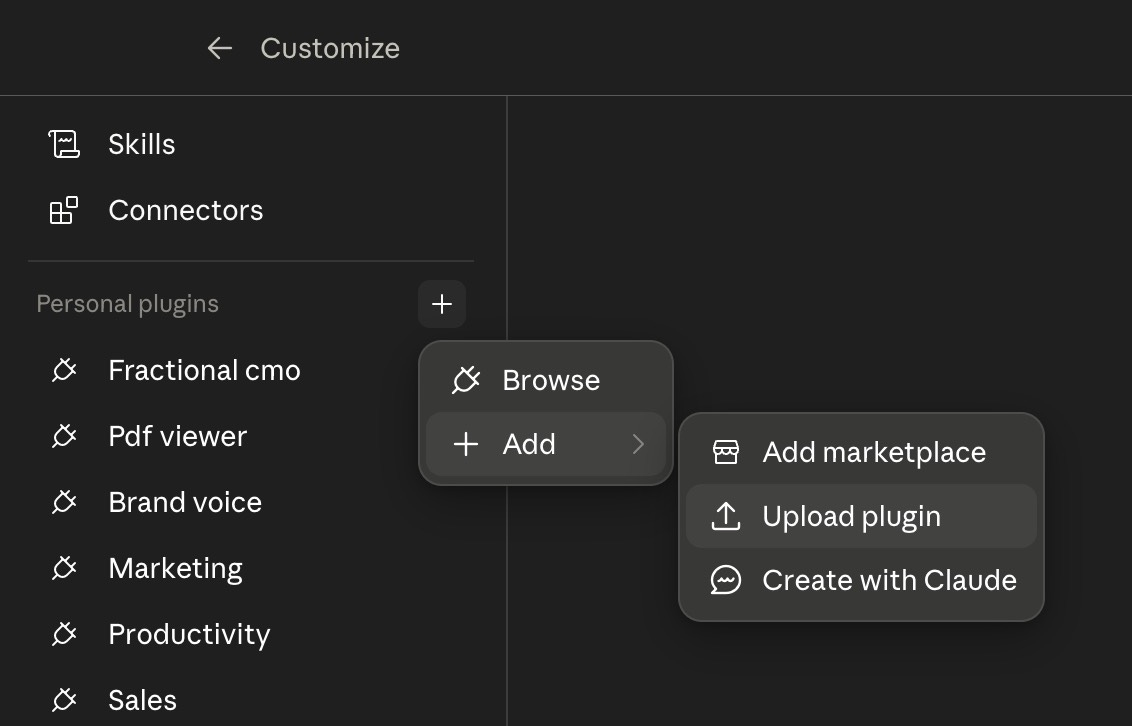
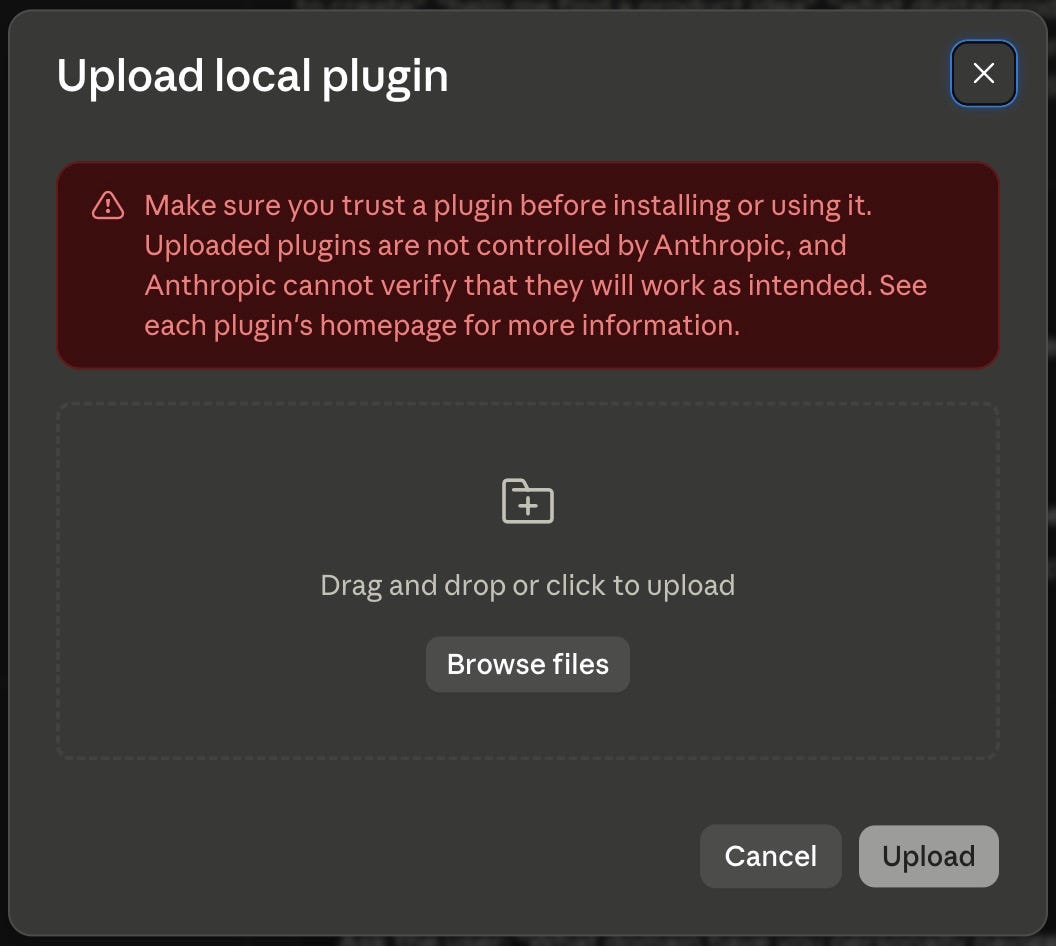
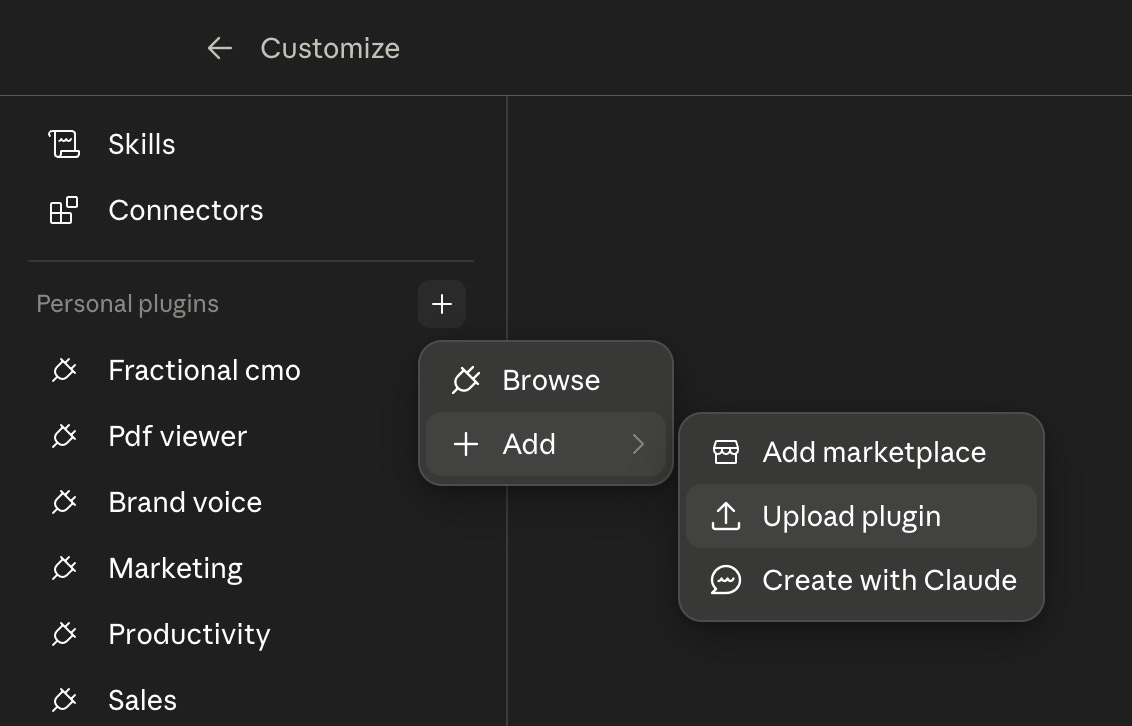
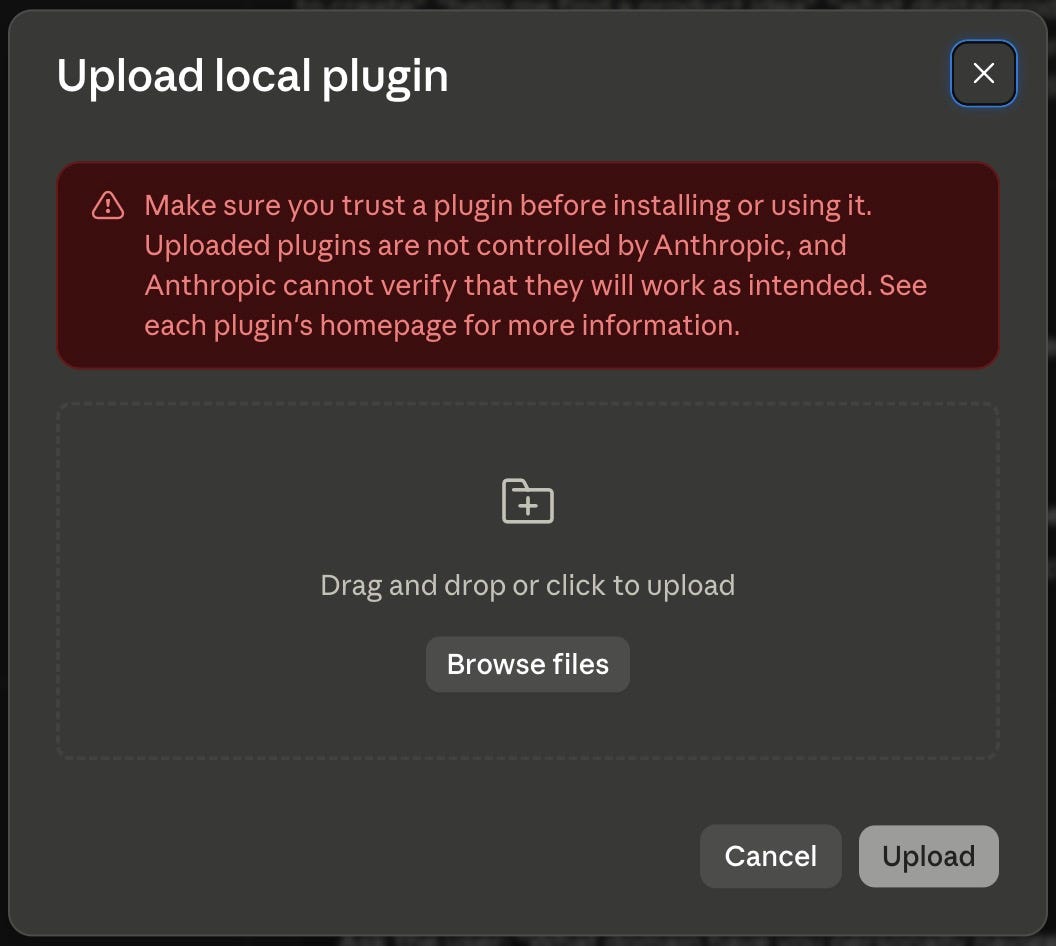
Complete Setup (the upload route) by selecting “Add” under plugins > “Upload plugin” > upload the plugin, OR
Place the unzipped solopreneur-os-for-claude folder inside the folder you give Cowork access to, and tell Claude at the start of a session: “Use the skills in the solopreneur-os-for-claude folder.”
Your solopreneur-profile.md should live in the Cowork working folder so skills find it automatically.
Onboarding also drops a CLAUDE.md pointer in that folder and asks you to paste the same block into the folder’s Folder Instructions (Settings > the connected folder), so Cowork loads it every session instead of only when a skill remembers to check.
Part 4: First Run
Run the onboarding interview
In a new chat (inside your Solopreneur HQ Project on Claude.ai, or your working folder in Code/Cowork), type:
Set me up
Claude runs the solopreneur-onboard skill: a short interview in batches covering your business, audience, offers, content channels, voice, and 90-day goal.
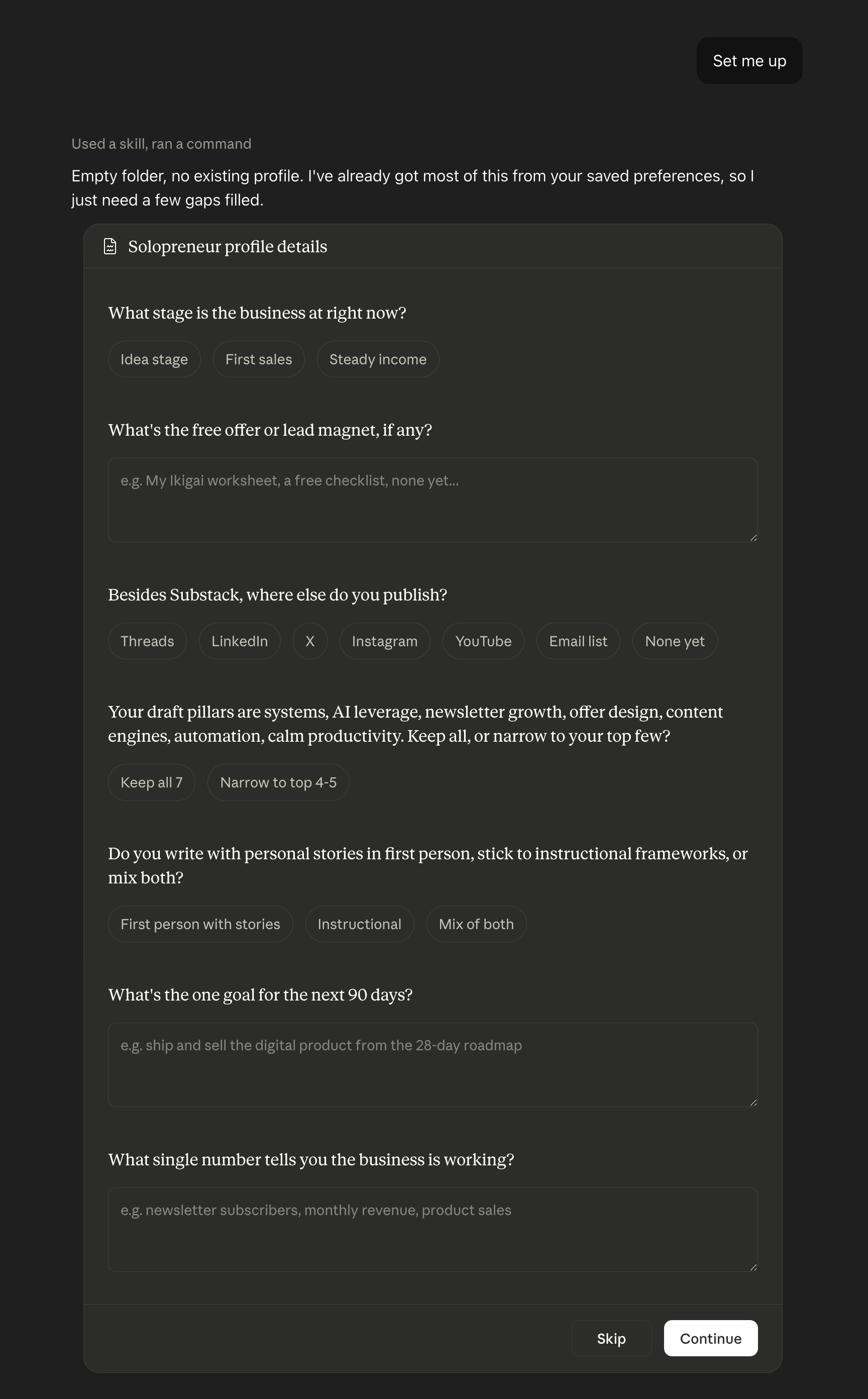
Answer conversationally.
Rough answers beat skipped ones, and everything can be updated later.
At the end, Claude produces your solopreneur-profile.md.
Place the profile (this step matters most)
Claude.ai: copy the profile text into your Solopreneur HQ Project. Either paste it into the Project’s instructions, or save it as a file named solopreneur-profile.md and upload it to the Project’s files. Run your business chats inside this Project from now on.
Claude Code: save solopreneur-profile.md in the folder you run Claude Code from (or your home working folder).
Cowork: save it in your Cowork working folder.
Every skill checks for this profile first. If a skill ever asks you basic questions about your business, the profile isn’t where that chat can see it. Move it per above.
Set up the CLAUDE.md pointer (Claude Code and Cowork)
On Claude Code and Cowork, onboarding also writes (or appends to) a CLAUDE.md file in your working folder that points at solopreneur-profile.md.
Claude Code loads CLAUDE.md automatically at the start of every session, so this closes the “did the skill remember to check” gap.
On Cowork, also paste the same block into the connected folder’s Folder Instructions (Settings > the connected folder).
That field is what Cowork is guaranteed to read every session. The CLAUDE.md file backs it up but doesn’t replace it.
Skip this on Claude.ai. The Project instructions step above already does the job.
Your first three tasks
“Plan my content week” (content-planner builds your 7-day plan)
“Write a LinkedIn post about [topic]” (content-generator, in your voice)
“Validate this idea: [your idea]” (idea-validator scores it honestly)
Part 5: Using the System
Say the job, get the skill
The weekly rhythm
Monday: “Run my Monday plan” (or /monday-plan). Paste any fresh numbers. Get the pulse plus the content week.
Tuesday to Friday: create and repurpose per the plan.
Friday or Sunday: “Run my weekly review” (or /weekly-review). Twenty minutes, three priorities out.
The build chain
When creating something to sell, the skills hand off in order:
validate the idea > design where it sits on the ladder > build the product > write the page > write the welcome and trust emails > plan the launch > debrief the numbers
Start anywhere. Each skill points you to the next step and the previous one if it’s missing.
Long outputs and checkpoints
newsletter-writer and product-creator pause for your approval at the outline or skeleton stage. Say “skip the outline” to go straight to a draft.
Product builds arrive in batches of sections. Reply “continue” between batches.
Part 6: Maintaining the System
Updating your profile
Your business changes. Say “update my profile” and tell Claude what changed: new offer, new price, new goal, new channel. Only those fields update. Replace the updated file per Part 4.
Refresh the 90-day goal quarterly. The Reflection Loop measures against it.
Getting product updates
Updates ship to buyers through Solopreneur Code (where applicable).
To update a skill on Claude.ai: delete the old one in Customize > Skills (the “...” menu), then upload the new zip. In Claude Code: replace the skill’s folder.
Part 7: Troubleshooting
A skill doesn’t trigger. Name the job more directly (”use the idea-validator on this”) or check the skill’s toggle is ON in Customize > Skills. On Claude Code, confirm the folder sits directly inside .claude/skills/ (the SKILL.md should be at .claude/skills/idea-validator/SKILL.md).
The wrong skill triggers. Say which one you want: “Use newsletter-writer for this.” Skills defer correctly once named.
Claude asks about my business despite onboarding. The chat can’t see your profile. On Claude.ai, confirm you’re chatting inside the Project holding it. On Code/Cowork, confirm solopreneur-profile.md sits in the working folder, and check that CLAUDE.md (Claude Code) or Folder Instructions (Cowork) points at it. Say “check your CLAUDE.md” if you’re not sure it loaded.
Upload fails on Claude.ai. Confirm the file ends in .zip and code execution is ON in Settings > Capabilities. This works on Free, Pro, Max, Team, and Enterprise. If the menus look different from this guide, search “skills” at https://support.claude.com for the current path.
Output ignores my voice rules. Check the Voice section of your profile lists the exclusions, then say “follow my profile’s voice rules.” If a rule keeps slipping, state it more absolutely in the profile (”Never use em dashes” beats “prefer fewer em dashes”).
Long product builds stall. Token limits end long chats. Start a fresh chat in the same Project and say “continue building [product name] from the skeleton,” pasting the approved skeleton if asked.
Support
Solopreneur OS for Claude v1.0.0. Claude is a product of Anthropic.
This product is an independent skill pack built on Claude’s custom skills system and is not affiliated with or endorsed by Anthropic.