
I Wish Notion AI Didn't Impose Usage Limits. Here's How I'm Working With Them Anyway
My system for working within Notion's new AI usage limits

Notion just rolled out usage allowances for Notion AI on Business and Enterprise plans.
Honestly, my first reaction wasn’t excitement.
I run most of my workspace, my content pipeline, and all my client work through Notion AI, so any limit on that feels like friction I didn’t ask for.
Since the update, I’ve noticed a small but real shift in how I work: I hesitate before calling on NOVA, my custom Notion AI agent, for smaller tasks.

There’s a split second where I ask myself “is this worth spending token on?” before I even open the prompt box.
That hesitation might be the real cost here.
The limit doesn’t stop me from getting work done, but it puts a psychological toll gate in front of a tool I used to reach for without thinking. Now I kept thinking of how much have I used, and I don’t enjoy it.
Access your FREE Solopreneur Success Hub - your subscribers-only comprehensive command center for building and scaling a successful one-person business.
I created this all-in-one toolkit for building a profitable one-person business, something I wish existed when I first started, and it saves me 20+ hours a week.
Now, it’s yours… FREE!
But wishing it away doesn’t change anything.
The limits are here, so this post is about the part I can control: using Notion AI smarter so I rarely bump into the ceiling in the first place.
What actually changed
This applies to Business and Enterprise plans only. If you’re on Free, Plus, or Team, none of this affects you yet.
Here’s the short version of how the new allowance works.
Usage is tracked in two windows: a rolling 6-hour window and a monthly window tied to your billing cycle.
The rolling window doesn’t reset all at once. Older usage just ages out gradually, so capacity frees up little by little rather than on a fixed clock.
The monthly window is the opposite. It resets in one shot at the start of your next billing cycle.
The allowance applies to things like your personal Notion Agent (including chat) and page translation.
It does not apply to AI meeting notes (which has its own daily cap), or to Custom Agents and Workers, which run on Notion credits instead.
If you’re an admin, you can turn on Notion credits as a fallback so people aren’t just stuck waiting when they hit the ceiling.
Personally, I don’t love leaning on credits.
I’d rather let the rolling window refresh naturally than pay per prompt on top of my plan. I also already have Claude Pro, so if NOVA is tapped out, I just shift that specific task over to Claude directly instead of reaching for credits.
You can check exactly where you stand any time in Settings → Notion AI → Usage, and Notion will nudge you inside Agent chat as you get close.
Making the best of it
Since I’m not going opt out, my approach is to make every prompt count.
A few habits I’ve picked up, straight from how the allowance is designed:
I batch the big stuff, grouping related asks into one request instead of five small back-and-forth prompts.
I stay in one thread for Notion AI Chat, since reusing context there means the agent isn’t reprocessing everything from scratch, which is cheaper than starting fresh each time.
I front-load specificity, stating the goal, the format, and what not to do up front, which cuts down on rework, and rework is what quietly burns through an allowance.
And I right-size the model, which changes how I work day to day more than any of the above, so it gets its own section below.
The real lever: matching the model to the task
Most of what eats into a usage allowance comes from dozens of small requests defaulting to the most powerful, and most expensive, model available, not from one giant request.
The fix is being deliberate about which model handles which job, not using AI less.
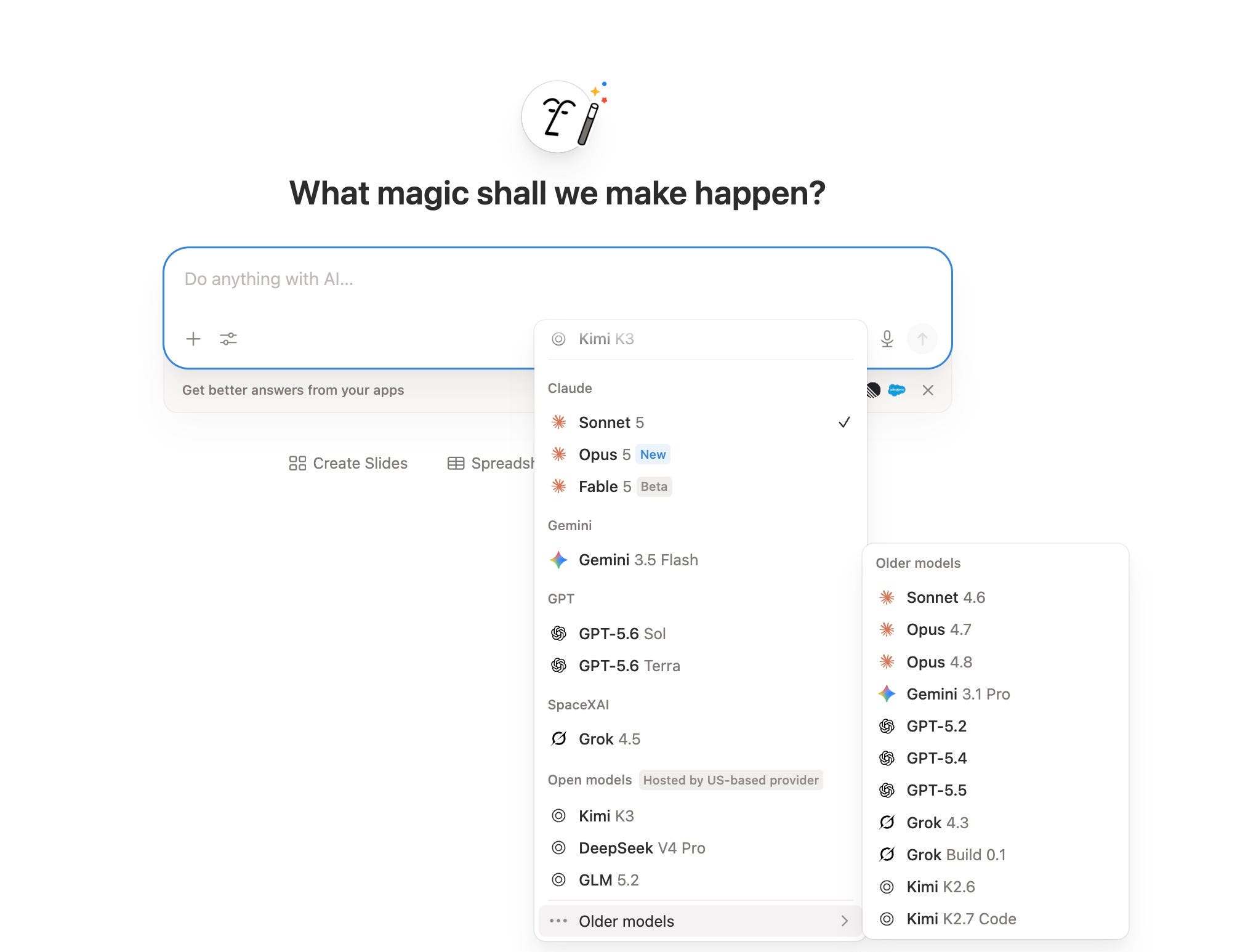
Switching models only takes a few seconds: open the prompt box, click the model name next to the send button (it defaults to Auto), and pick from the dropdown grouped by provider.
Older generations live in a secondary drawer so the main list stays clean.
Here’s the breakdown I’m now using across my own workspace:
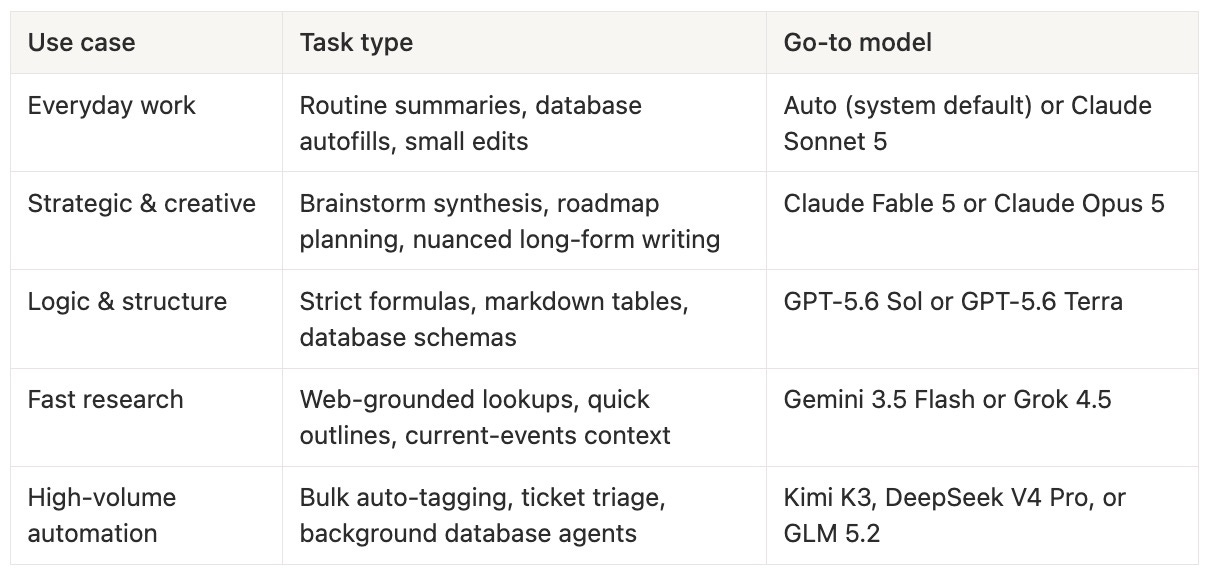
The logic is simple: save the expensive, high-reasoning models for the moments where a shallow answer actually costs you something, like turning a messy brain dump into a real strategy doc.
For everything else, a lighter or cheaper model gets the job done without touching your allowance as hard.
A couple of practical examples from my own workflow:
Auto-filling status fields across a project database
→ cheap, fast model, every time.
Turning scattered meeting notes into a coherent Q3 plan
→ worth spending on Claude Fable 5 or Opus 5.
Cleaning up a strict markdown table or debugging a database formula
→ GPT-5.6 Sol, which follows instructions literally instead of summarizing them away.
Pulling a quick, current summary of a trend to sketch an outline
→ Gemini 3.5 Flash, since speed and freshness matter more than depth here.
A free resource if you want to copy this
I put together a full directory of the current Notion AI models, what each one is actually good at, when to reach for it, and where it sits on cost, so you don’t have to piece it together yourself every time the model picker changes.
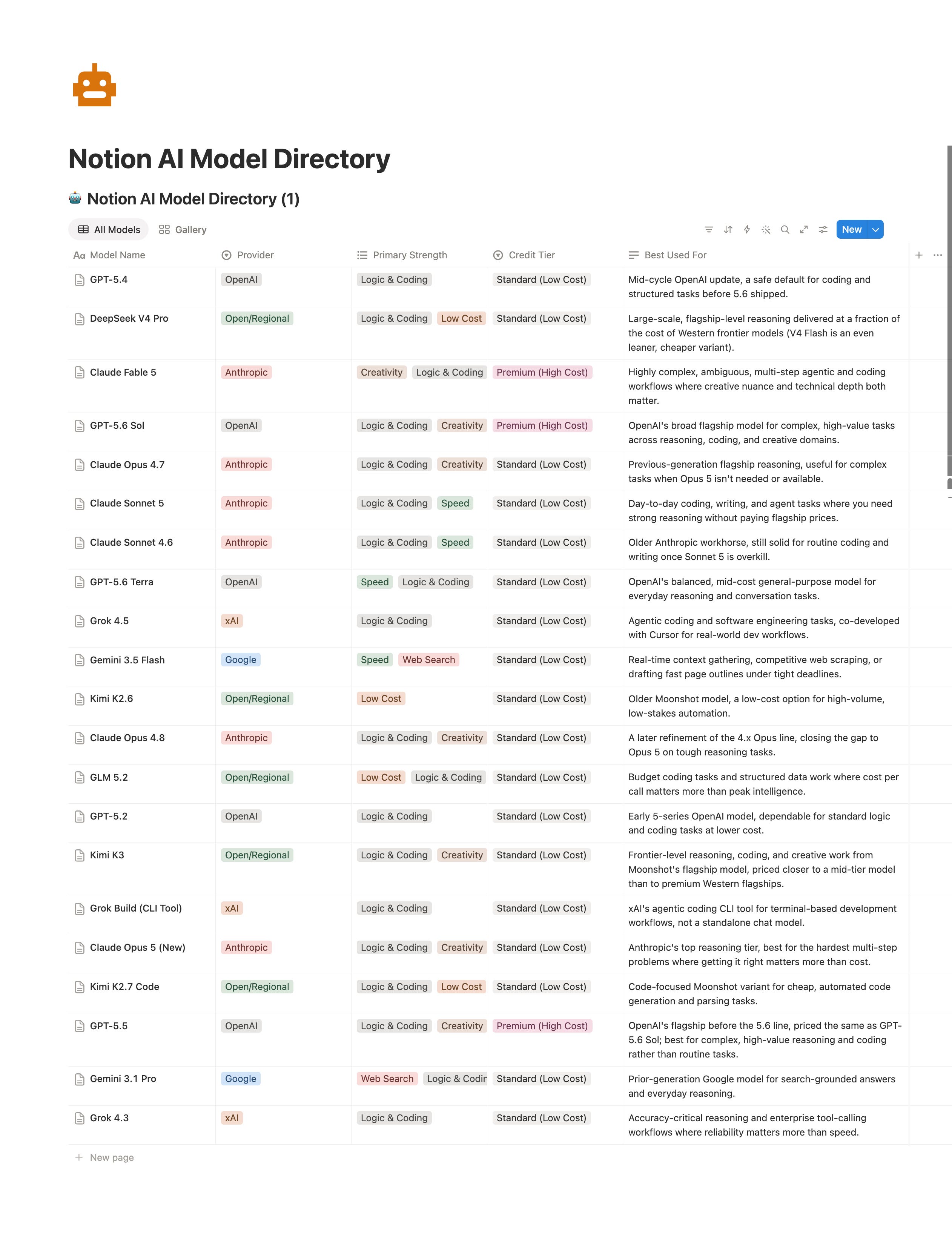
It’s free to view and duplicate:
Grab it, adapt it, and use it as your own cheat sheet for keeping usage in check.
If Notion keeps shipping new models at this pace (and it will), the real skill is building a system that tells you which one to reach for, not memorizing every model.
That’s what keeps the usage allowance from getting in your way.
If this was useful, subscribe for more breakdowns like this.
And if you’re curious how NOVA, my custom Notion AI agent, came together in the first place, I wrote the full story here:
You’re doing everything. But nothing is moving?
You are doing everything. But nothing is moving.
That is not a motivation problem.
Most solopreneurs are learning from everywhere and getting nowhere. Too much information. No clear system connecting effort to results.
You have everything it takes. You just do not have a clear system yet.
That is what paid subscribers get. Every system, playbook, prompt, and template. All inside the Premium Vault.
All for $79/year. That’s $6.58/month.
Upgrade now and unlock the Premium Vault worth thousands of dollars.

The Premium Vault holds the secret behind posts like this one, including the tools and resources I use to build the one-person business I love.

Thanks for reading! Ready for the next step?
Let’s crack the growth equation and build a thriving one-person business on your terms!
Anfernee
I wonder whether the usage limit changes behaviour more than the pricing itself.
Once every prompt feels scarce, people may stop exploring and use AI only for tasks whose value they can already predict. That sounds efficient, but experimentation is often where unexpected workflows are discovered.
Model routing can stretch the allowance, but does it also make the user spend more attention managing the tool than thinking through the work?