
Notion AI Can Now Generate Images, Photos, and Mockups. I Tested It Against Gemini and ChatGPT. Here's Who Won.
I ran the same prompts on Notion AI, ChatGPT, and Gemini. The results surprised me.

Access your FREE Solopreneur Success Hub - your subscribers-only comprehensive command center for building and scaling a successful one-person business.
I created this all-in-one toolkit for building a profitable one-person business, something I wish existed when I first started, and it saves me 20+ hours a week.
Now, it’s yours… FREE!
More information about the Hub here.
Notion AI now ships with native AI-powered block types that generate images, photos, charts, diagrams, and mockups right inside your workspace.
This means a ton of time saving for someone like me who spends most of my time in my Notion Workspace.

But the real question is, how do those outputs stack up against the heavy hitters like ChatGPT and Gemini Nano Banana 2?
I ran the same prompts across all three platforms to find out.
One scenario. Five block types. Three AI platforms. Zero tweaking.
Let’s see!
The Setup
Every test used one consistent scenario:
“You’re a solopreneur launching a $47 digital productivity course in 30 days.”
This keeps the comparison grounded in a real workflow where every prompt connects to an actual task I personally face during a product launch.
The rules were simple:
Same prompt text on all three platforms. No adjustments.
Latest model versions on each (GPT-5.3, Gemini Nano Banana 2, Notion AI native blocks).
Screenshots captured immediately after generation.
Let’s get into it.
AI Image
The Prompt:
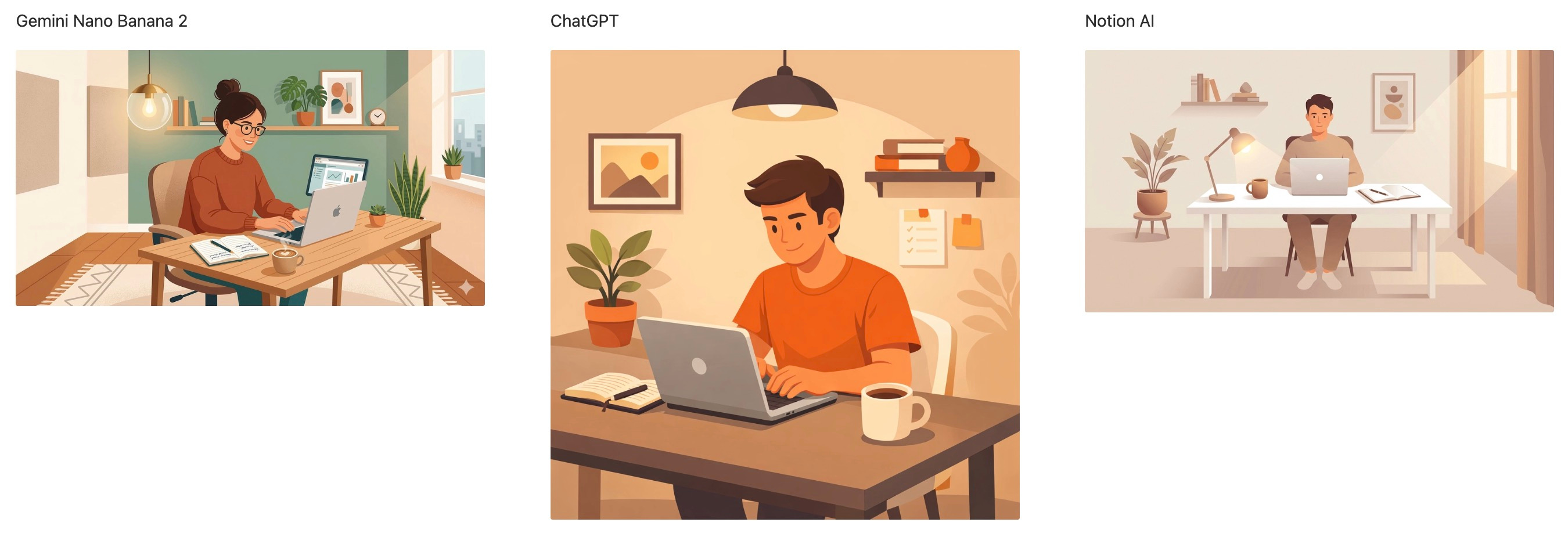
“Create an illustration of a solopreneur working at a minimal desk setup with a laptop, notebook, and coffee. Warm lighting. Modern flat design style.”
What Happened
Gemini nailed the brief. Bold colors, warm lighting, clean flat design. Exactly what the prompt asked for. This was the strongest output of the three.
ChatGPT leaned more painterly and realistic than flat design. The composition was polished and detailed, though the style landed slightly different from what the prompt asked for.
Notion AI produced a clean, accurate illustration that matched the flat design brief well. It dropped straight into the page, which is something I appreciate.
Verdict: Gemini wins this round. It followed the style brief most faithfully. ChatGPT and Notion AI both delivered strong results, but Gemini’s output is the one you’d actually use for a flat design asset.
AI Photo
The Prompt:
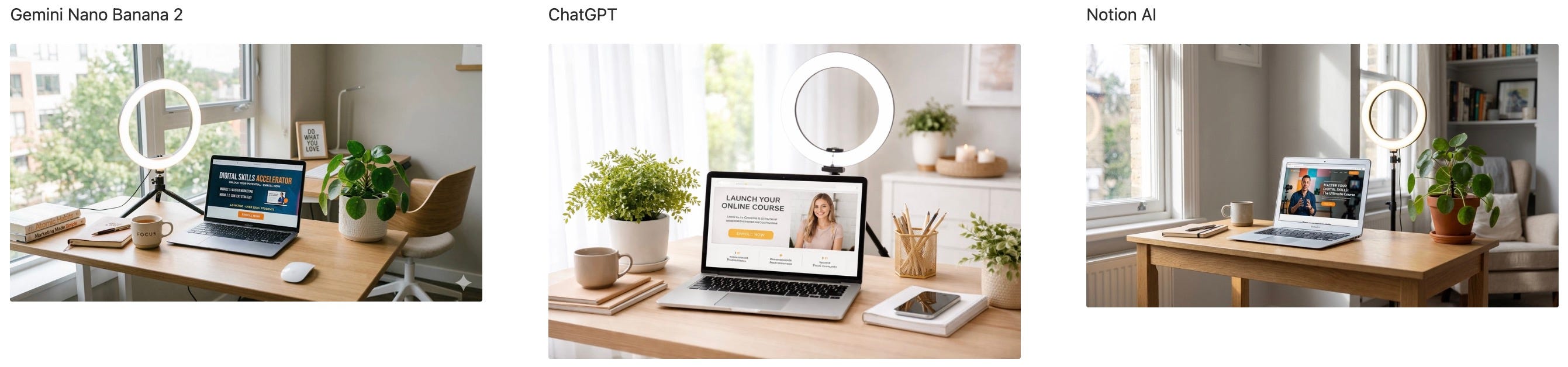
“Generate a realistic photo of a home office desk with a laptop showing a course sales page, a ring light, and a plant. Clean, bright, aspirational.”
What Happened
Gemini produced a bright, realistic desk scene with all the requested elements. The ring light, plant, and laptop were present. The overall mood was aspirational and clean.
ChatGPT generated a highly detailed, stock-photo-quality image. The course sales page on the laptop screen was partially legible, adding a nice touch of realism.
Notion AI created an equally impressive composition. Bright, clean, and aspirational with all elements accounted for. Indistinguishable in quality from the other two.
Verdict: Three-way tie. All three platforms delivered realistic, high-quality photos that you could use as a blog header or social post without hesitation. No clear winner here.
AI Chart
The Prompt:
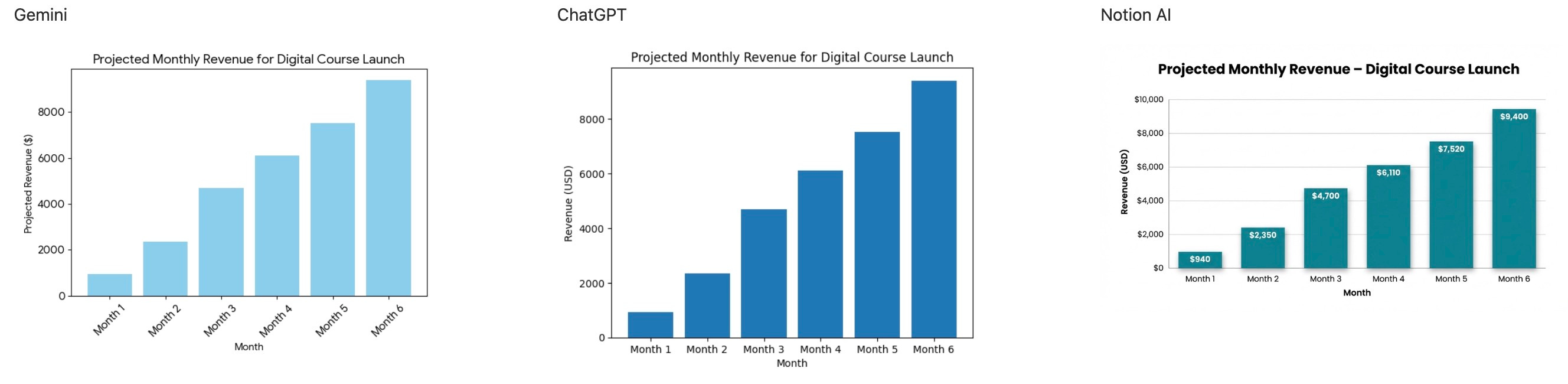
“Create a bar chart showing projected monthly revenue for a digital course launch: Month 1: $940, Month 2: $2,350, Month 3: $4,700, Month 4: $6,110, Month 5: $7,520, Month 6: $9,400.”
What Happened
Gemini rendered a functional chart with clean axes and readable labels. Solid, but the visual styling was simpler compared to the other two.
ChatGPT produced the most visually polished bar chart. Strong color coding, clear labels, and a presentation-ready layout. This is the one you’d drop into a pitch deck.
Notion AI generated a native chart block with accurate data and clean formatting. The big advantage: it’s a living, editable chart inside your workspace. No static image. You can update the numbers anytime.
Verdict: ChatGPT and Notion AI share the top spot. ChatGPT wins on visual polish for external presentations. Notion AI wins on usability, since the chart lives in your workspace and stays editable. Gemini is functional but a step behind on styling.
AI Diagram
The Prompt:
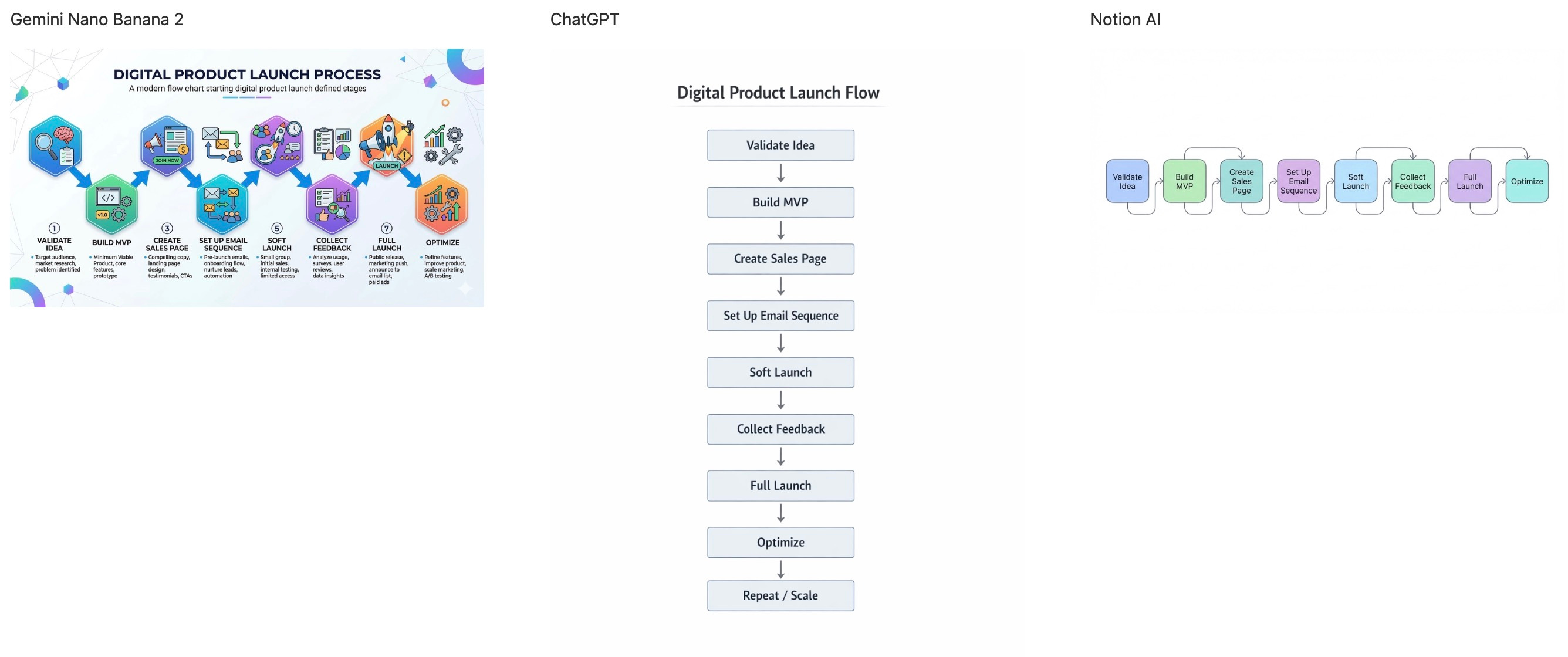
“Create a flowchart of a digital product launch process: Validate Idea → Build MVP → Create Sales Page → Set Up Email Sequence → Soft Launch → Collect Feedback → Full Launch → Optimize.”
What Happened
Gemini crushed this one. It produced a visually rich, circular flowchart with colorful icons for each step. Easy to read, easy to share. This is the diagram you’d put in a presentation or onboarding doc.
ChatGPT defaulted to a plain vertical layout with simple text boxes and arrows. The structure was correct, but the visual presentation felt bare and unfinished.
Notion AI generated a horizontal strip of icon blocks. Compact and embedded, but harder to read at a glance compared to Gemini’s output. The visual hierarchy wasn’t as clear.
Verdict: Gemini wins by a wide margin. Its diagram is the only one that looks presentation-ready out of the box. ChatGPT and Notion AI both delivered functional but visually underwhelming results.
AI Mockup
The Prompt:
“Create a mobile app mockup of a course landing page with a hero image, headline ‘Master Your Productivity in 30 Days’, a price tag of $47, and a ‘Buy Now’ button.”

What Happened
Gemini produced a realistic phone mockup with a hand holding the device. The headline, price tag, and Buy Now button were all clearly visible. It looked like an actual product photo you’d use in marketing.
ChatGPT generated something closer to a stylized poster or illustration than a device mockup. The elements were present, but the output didn’t feel like a real mobile app screen. More artistic, less functional.
Notion AI delivered two clean phone mockup variations with all the requested elements in place. Realistic device framing, readable text, and a clear CTA button. Strong output with options to choose from.
Verdict: Gemini and Notion AI share the win. Both produced realistic, usable device mockups. ChatGPT’s output looked more like a marketing illustration than an actual app mockup, which missed the brief.
The Scorecard
The Big Takeaway
The expected winner: Gemini
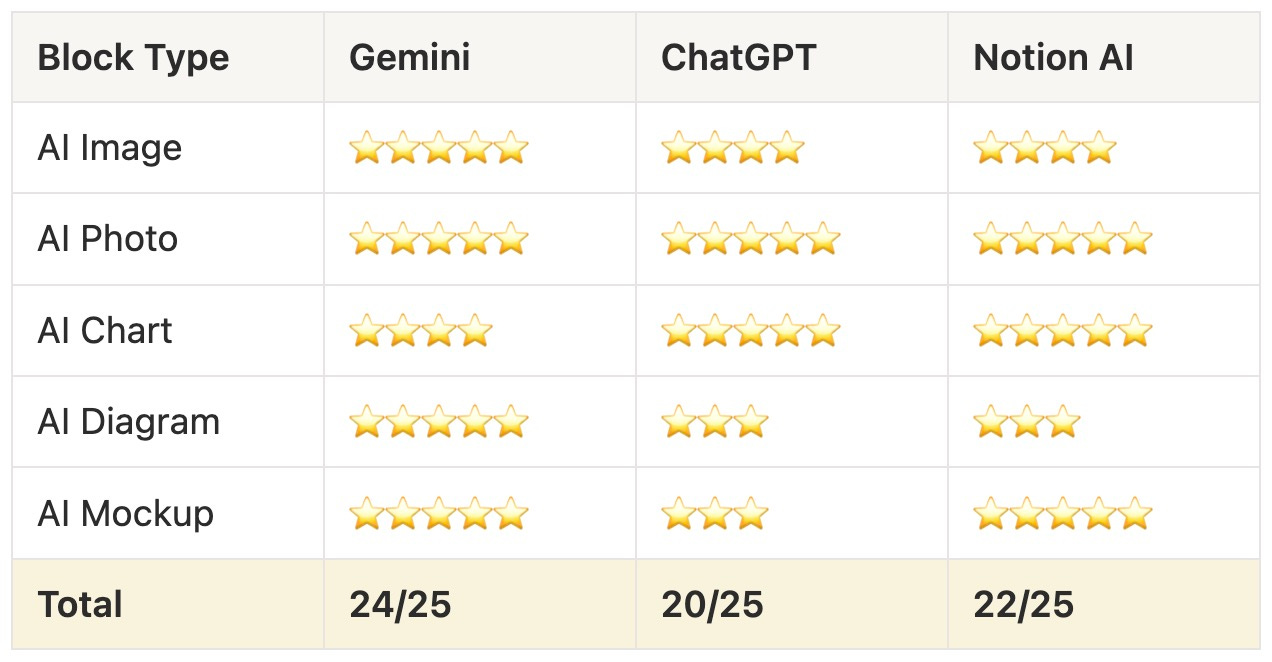
Gemini scored 5 stars in four out of five categories and 4 in one.
That’s 24/25.
It was the most consistently strong performer in this test, delivering high-quality outputs for every block type, from illustrations to diagrams to mockups.
If you need a single platform that handles everything well, Gemini is hard to beat right now.
Where Notion AI shines
Integration and quality.
Notion AI scored 22/25, just two stars behind Gemini.
It even beats ChatGPT in Mockup.
The real advantage: everything generates directly in your workspace, and I totally love this.
For solopreneurs who live in Notion, this is the productivity multiplier.
Everything land right where you need them.
Where ChatGPT fits
ChatGPT scored 20/25.
Its strengths are charts and photos, where it matched the best.
But it scored lowest overall, falling short on diagrams and mockups where it defaulted to less functional outputs.
ChatGPT remains the go-to for polished, presentation-ready data visuals.
But for broader creative tasks, Gemini and Notion AI have pulled ahead.
The real question
You don’t need to pick one.
Use Notion AI when you want speed and workflow integration.
Use Gemini when you need the highest visual quality across the board.
Use ChatGPT when you need a specific chart or photo with maximum polish.
Your Turn
Try it out yourself and see which outputs work best for your workflow.
The best AI tool is the one that fits how you already work, not the one with the flashiest output.
Btw, I spent $5,998 so you don’t have to.
I spent $5,998 on Hormozi’s full Money Models bundle.
All the books, playbooks, and workshops.
Then I turned it into a tool my paid subscribers can use to stress-test their offers, pricing, and business models before they build them.
It’s called The $100M Brain.
If you want to run your money model through Hormozi-style logic before you launch, access this special tool here:
Not a paid member yet?
Upgrade now and unlock the Premium Vault.
Get instant access to systems, prompts, challenges, frameworks, AI tools, and resources worth thousands.
See the full benefits of becoming a paid subscriber below.
Your future self will thank you.


“The best tool isn’t the most powerful one. It’s the one that fits your workflow.”
Thanks for reading! Ready for the next step?
Let’s crack the growth equation and build a thriving one-person business on your terms!
Anfernee
Loved your comparisons. Definitely eye opening and making it to choose depending on the task.
Thanks for me both time ⌚ and money 💰
That is so cool