
My Notion Mind Dump Had 200+ Ideas. I Read Maybe 2 of Them (Here's How I Fixed It)
For solopreneurs who capture ideas but never review them. This skill reads your Mind Dump database and delivers a filtered summary of what matters based on your active priorities

I Have a Notion Mind Dump Folder. I Never Opened It.
I’ve had a mind dump database in Notion for over a year.
Every time an idea hit, I added it.
Articles I wanted to read, frameworks I half-formed, prompts worth saving, random observations from my week.
Hundreds of entries. All sitting there.
And in that entire year, I opened the folder to actually read through it maybe twice.
The tool wasn’t the problem. The habit was. I never built a reason to go back.
The Inbox Nobody Reads
Most of us have some version of this. A bookmarks folder you swore you’d return to. A notes app full of half-baked ideas.
A “read later” list that became a graveyard.
The capture system worked. The review system didn’t exist.
I knew this was a problem, but I kept treating it like a willpower issue. “I’ll set aside time on Sundays.” I didn’t.
The folder stayed full. Nothing came out of it.
The fix wasn’t a new habit. It was removing the habit entirely.
A quick note before I continue: everything below is written around my own setup, a Notion mind dump database. But the concept and the prompt itself aren’t Notion-specific. If you curate your ideas somewhere else, a Google Doc, Apple Notes, Evernote, Airtable, whatever, the same system works. Just swap in the URL or location of wherever you dump your thoughts.
What I Built Instead
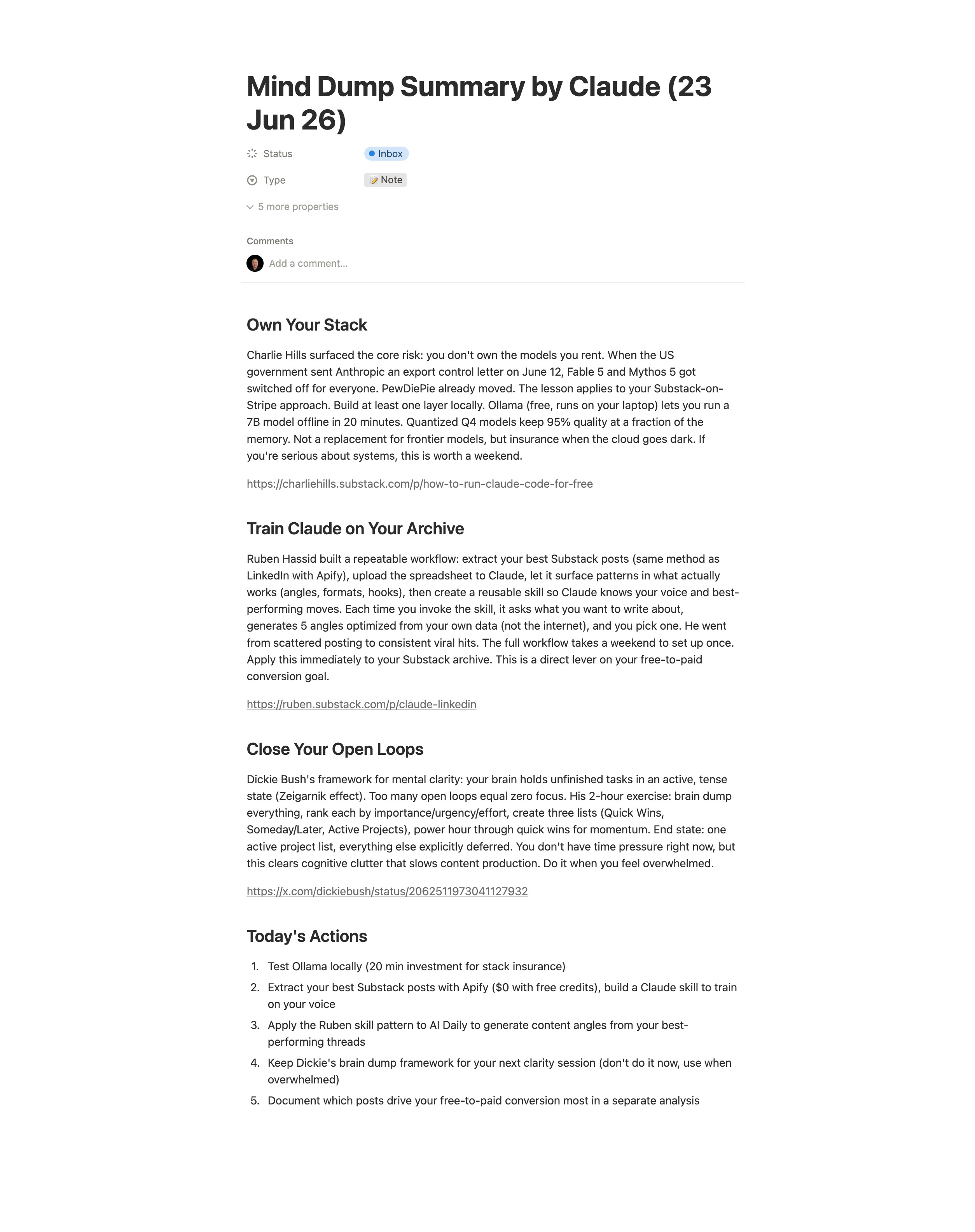
I set up a Claude Cowork scheduled task that runs automatically and does what I was never going to do manually: reads through everything I added to my Notion mind dump in the past 48 hours, then delivers a structured summary directly to me.
I don’t have to remember to open the folder. I don’t have to scan through 30 entries to figure out what matters. The task does that for me and surfaces the things most relevant to what I’m currently working on.
The output is an 800-word digest, grouped by theme, with links to anything worth reading in full. At the end, it gives me a short list of actions or decisions that came out of the entries.
One read-through, and I know what’s worth my attention.
How the Prompt Is Structured
The prompt tells Claude what I’m working on right now: growing Solopreneur Code, running the Solopreneur Mastery Club, building content systems, and developing my AI Daily Telegram channel. It knows what to prioritise based on that context.
It filters out noise: vague entries with no clear relevance, duplicates of ideas I’ve already built into my systems, random observations that don’t connect to anything active.
It groups what’s left by theme, not by the order things were added. So if I saved three unrelated things that all touch on audience growth, they appear together.
The “Today’s actions” section at the end is the part I read first. It’s short, always five items or fewer, and it only includes things with a decision or a next step attached.
What Changed After Setting This Up
The mind dump became useful for the first time.
Before, it was a holding area with no exit. Ideas went in, nothing came out.
Now there’s a daily loop: I add to it whenever something’s worth capturing, and the summary brings the relevant pieces back to me the next morning.
I’ve started using it more because I trust that the good stuff won’t stay buried. That feedback loop is what was missing.
The other change: my capture habit got better.
Knowing there’s a system reading through it means I’m more willing to add half-formed ideas without pressure to immediately make sense of them. The task does the sorting later.
How to Set This Up
You need three things: a Claude Pro or Team plan, Claude Desktop installed on your computer, and a Notion account (or any form of depository) with an existing database you dump ideas into.
If you don’t have a Mind Dump database yet, create one in Notion. Add a simple text property for the entry and a date property for when it was created. That’s enough to get started.
Step 1: Connect Notion (or wherever your depository is) to Claude
Open Claude Desktop. Go to Settings, then Integrations. Find your mind dump platform in the list and connect it. You’ll be asked to grant Claude access to your workspace. Approve it.
Once connected, Claude can read your databases directly.
Step 2: Get your database URL
Open your Mind Dump database in Notion. Copy the URL from your browser. It will look something like this:
https://www.notion.so/yourname/[database-id]
You’ll paste this into the prompt in the next step.
Step 3: Create the scheduled task in Claude Cowork
Open Claude Desktop and go to the Cowork tab. Click “New Task” and select the scheduled option. Set the frequency to every 24 or 48 hours, depending on how often you add entries.
Paste the full prompt from the section above into the task field. Replace the database URL with your own. Update the “About” section with your name, current projects, and active priorities.
Save the task.
Step 4: Let it run
Claude will read your database on the schedule you set and deliver the digest directly inside Claude Desktop. You don’t need to trigger it manually.
The first time it runs, check the output against what’s actually in your database. If it’s surfacing the wrong things, tighten the focus areas in the “About” section of the prompt. The more specific you are about your current priorities, the better the filtering gets.
The whole setup takes under 20 minutes. After that, it runs without you.
The Prompt
This prompt is one of dozens locked inside the Premium Vault along with automation blueprints, done-for-you templates, and the full AI Toolbox.
If you want the exact prompt (plus everything else paid members get), upgrade below, it pays for itself the first time you use it.
You’re doing everything. But nothing is moving?
You are doing everything. But nothing is moving.
That is not a motivation problem.
Most solopreneurs are learning from everywhere and getting nowhere. Too much information. No clear system connecting effort to results.
You have everything it takes. You just do not have a clear system yet.
That is what paid subscribers get. Every system, playbook, prompt, and template. All inside the Premium Vault.
All for $79/year. That’s $6.58/month.
Upgrade now and unlock the Premium Vault.


You’ll need to update the database URL and the context section to reflect your own active projects. Everything else works as written.
If your mind dump folder is full of things you saved and never returned to, this is worth 20 minutes to set up.
What’s sitting in your own system that you haven’t looked at in months?
