
How to Make AI Writing More Human
Learn how to strip the clichés out of AI writing using Wikipedia's own guide, and turn it into a skill.

AI can draft in seconds but it can’t hide.
You’ve seen the tells.
The em dash in every other sentence (I see this everywhere now).
The “it’s not just a tool, it’s a mindset.”
The word delve showing up where no human would put it.
Your readers feel it too, even when they can’t name it. I’m not sure about you, but I can feel it the moment I read the first paragraph.
The writing feels hollow even though there are lot’s of information.
Access your FREE Solopreneur Success Hub - your subscribers-only comprehensive command center for building and scaling a successful one-person business.
I created this all-in-one toolkit for building a profitable one-person business, something I wish existed when I first started, and it saves me 20+ hours a week.
Now, it’s yours… FREE!
The fix is simpler than most people think, and the best training material for it is free.
This post shows you how to humanize AI writing using Wikipedia’s own guide to spotting machine-written text, then how to turn that into a reusable skill so you never have to think about it again.
If you’re on a free plan, or you use ChatGPT or Gemini instead of Claude, there’s a workaround too.

Why AI writing has a tell
Large language models are trained to sound agreeable, balanced, and safe.
This is useful for a support bot, but really bad for writing that’s supposed to sound like a person with a point of view.
So the model reaches for the same framework over and over again.
It hedges (”it’s important to note”).
It inflates (”a rich tapestry of ideas”).
It wraps up every section with a tidy summary you didn’t ask for.
Individually these are small, but if you stacked them across 800 words, they scream “a machine wrote this.”
The substance is fine most of the time. It’s usually the packaging.
So you don’t need to rewrite from scratch. You need a filter that catches the patterns and strips them out while leaving your meaning intact.
The best cheat sheet is free
Wikipedia has a volunteer team that cleans up AI-written articles.
They’ve reviewed thousands of them, and they published every recurring pattern they kept finding.
It’s a public page called Signs of AI Writing. It’s probably the most practical AI-detection guide out there, and it costs nothing.
It’s also specific.
It doesn’t say “avoid clichés.” It names them.
Puffery, editorializing, the rule of three, hollow section summaries, the overuse of em dashes and “moreover,” the promotional tone that treats every subject like a press release.
It’s a checklist you can hand straight to an AI and say: don’t do any of this.
The fastest fix: build a Humanizer skill
If you are using Claude on a paid plan or Notion AI, you can turn that guide into a saved skill.
A skill is a reusable instruction set that lives in your account and fires on a trigger word.
Build it once, use it forever.
Setup takes about two minutes:
Open the Signs of AI Writing page and copy the full text.
Start a chat with Claude and paste the prompt below.
Paste the full guide text into the same chat, along with the link.
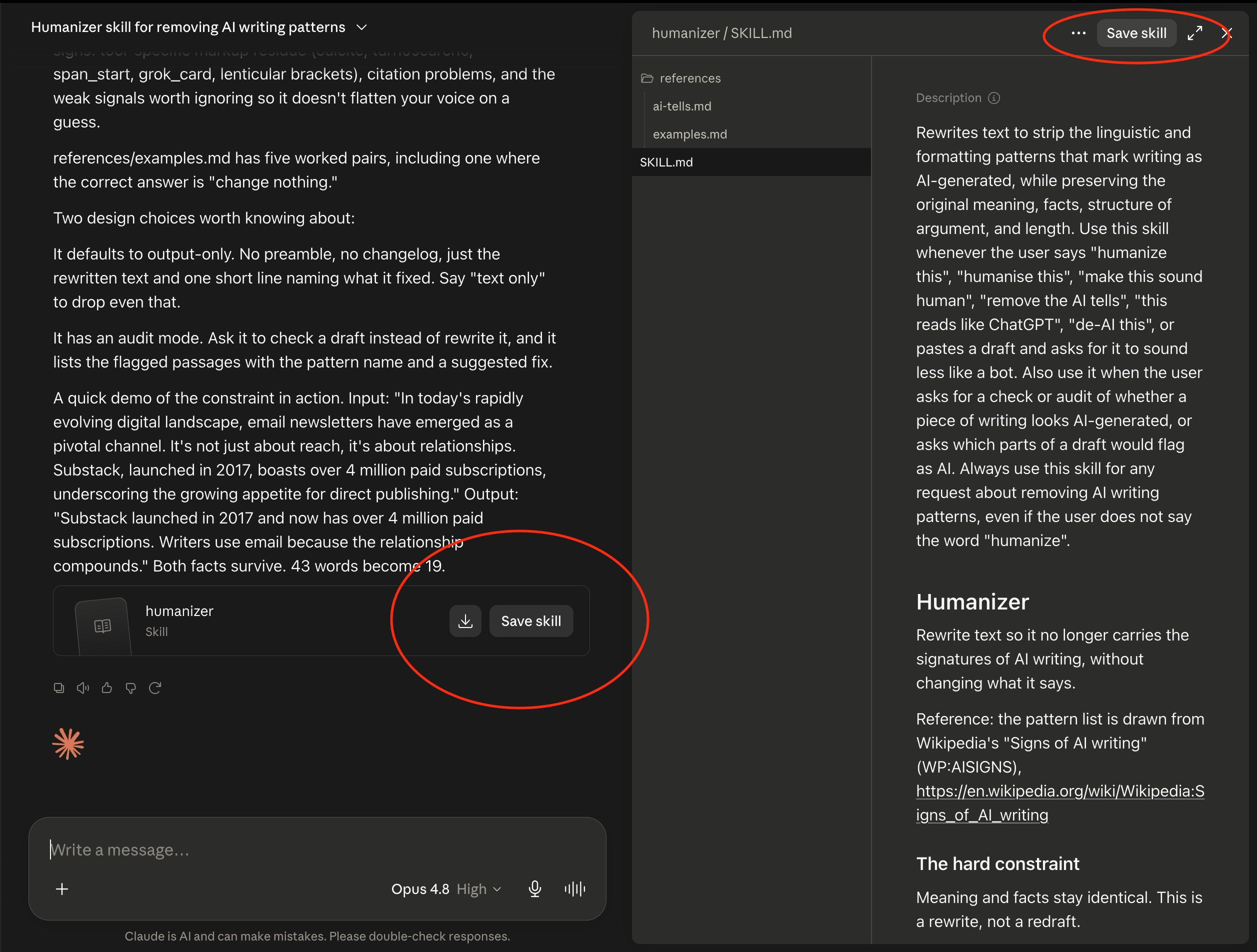
When Claude generates the skill, click Save Skill.
From then on, whenever you type “/humanizer” or “humanize this” followed by your draft, the skill fires up and do all the work.
The exact prompt
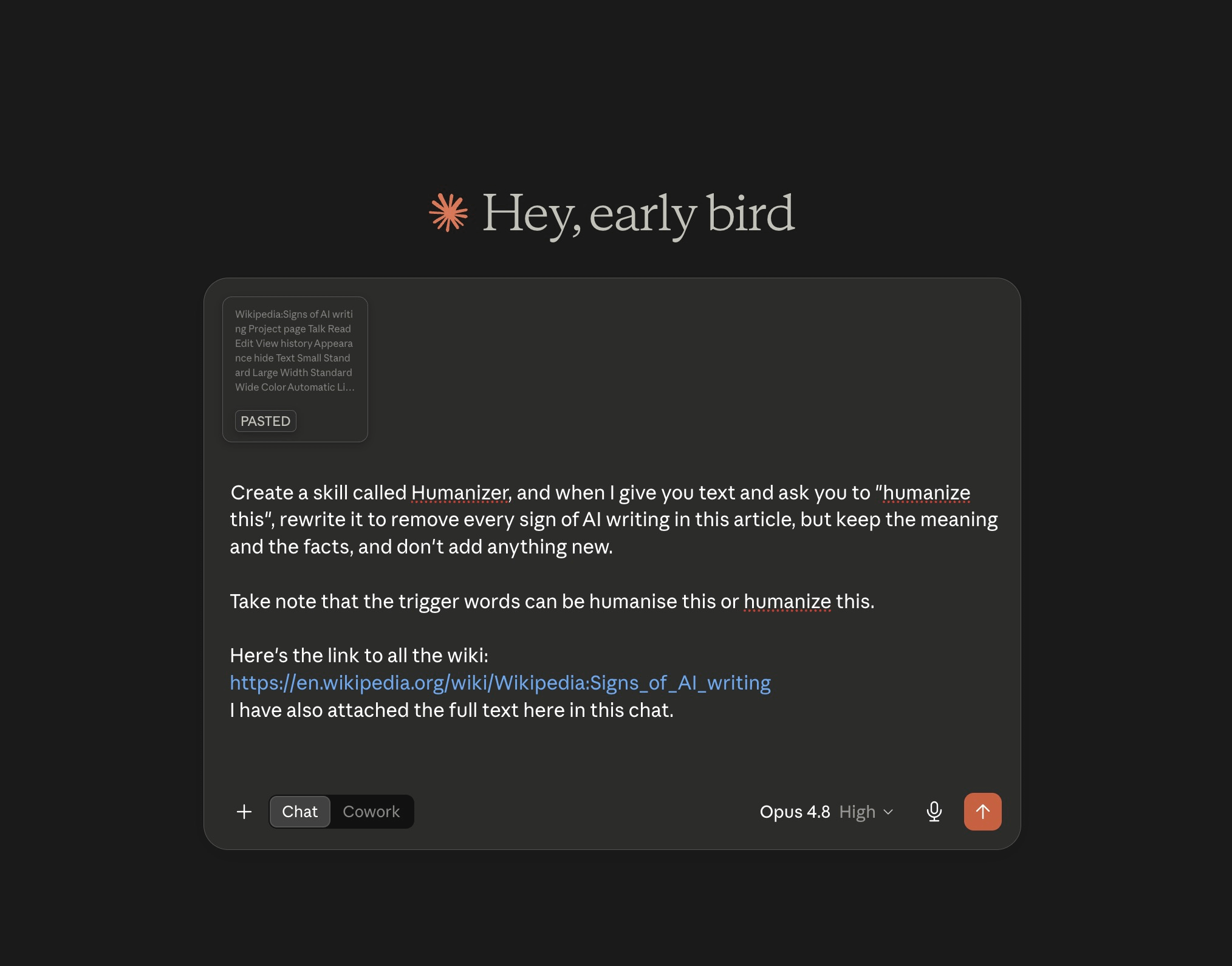
Create a skill called Humanizer. When I give you text and ask you to “humanize this,” rewrite it to remove every sign of AI writing described in this guide, but keep the meaning and the facts, and don’t add anything new.
The trigger words can be “humanise this” or “humanize this.”
Here’s the link to the guide: https://en.wikipedia.org/wiki/Wikipedia:Signs_of_AI_writing
I’ve also pasted the full text below.
Paste the full guide text into the chat on top of just having the link. I find that sometimes the models don’t always fetch and read a URL reliably.
Giving it the raw text is more consistent, and your skill still works if the page changes later.
How to save it
After Claude drafts the skill, it shows you a summary and a save button.
Click “Save Skill”.
It then appears in your skills list, and the trigger phrase works across your chats.
You can edit it anytime to add your own banned words, which is worth doing once you know your personal tells.
No paid plan? Here’s the workaround
Skills are a paid Claude feature. The method underneath doesn’t need them, and it works the same on free Claude, ChatGPT, or Gemini.
Instead of saving a skill, paste the instructions at the top of a chat every time. Keep a note somewhere handy with three things in it:
The link to the Signs of AI Writing guide
The full copied text of that guide
A short instruction: “Rewrite the text I give you to remove every sign of AI writing in this guide. Keep the meaning and facts. Add nothing new.”
Then drop your draft below it.
Same result with one additional copy-paste.
If you write with AI often, save that note as a template or a saved prompt so it’s always a click away.
And that’s it!
The patterns worth stripping first
You don’t have to memorize the whole guide to get most of the benefit.
A handful of patterns account for the majority of that “AI wrote this” feeling.
The ones I’d catch first:
Puffery. Words that sound impressive and mean nothing. Delve, leverage, tapestry, testament, robust, seamless, groundbreaking. If a word only appears in marketing copy and LinkedIn posts, cut it.
The rule of three. AI loves listing things in threes. “Clear, concise, and compelling.” One or two real points beat three padded ones. Vary it.
Hollow summaries. The paragraph that starts “In conclusion” and repeats what you said. Delete it. Trust your reader.
Hedging. “It’s important to note,” “it’s worth mentioning,” “generally speaking.” State the thing directly.
The false contrast. “It’s not just X, it’s Y.” “This isn’t about A, it’s about B.” Sounds deep, says little. Make the point straight.
Em dash overload. AI scatters them everywhere. Swap most for commas, or split the sentence in two.
Promotional tone. Writing that treats every subject like the best thing ever built. Neutral, specific language reads as more human and more trustworthy.
Run a draft through a filter trained on these and it comes out sounding noticeably more like a person.
How to humanize AI writing without losing your voice
A humanizer strips out the machine tics.
It doesn’t give you a voice.
Those are two different jobs.
Use it as a cleanup pass.
Draft your idea, run it through the filter to kill the clichés, then do one final read where you add the things only you can add.
A specific example from your own work.
A blunt opinion.
A line that sounds like how you actually talk.
That last human pass is what turns “not obviously AI” into “clearly you.”
You’re doing everything. But nothing is moving?
You are doing everything. But nothing is moving.
That is not a motivation problem.
Most solopreneurs are learning from everywhere and getting nowhere. Too much information. No clear system connecting effort to results.
You have everything it takes. You just do not have a clear system yet.
That is what paid subscribers get. Every system, playbook, prompt, and template. All inside the Premium Vault.
All for $79/year. That’s $6.58/month.
Upgrade now and unlock the Premium Vault worth thousands of dollars.


Thanks for reading! Ready for the next step?
Let’s crack the growth equation and build a thriving one-person business on your terms!
Anfernee
Nice!