
How to Build a Weekly Dashboard That Runs Your Week
Here's how to build a weekly dashboard that carries the memory load for you, backed by a 1956 Harvard study and buildable in an afternoon (includes free prompt).

Think back to last Friday.
Did you close the week clean, or did you spend the weekend with that itch at the back of your skull, sure you forgot something but unable to name it?
I lived in that state for years. This post is about the fix I wish I’d found sooner, a single spread I call a weekly dashboard that holds your week so your brain doesn’t have to.
Access your FREE Solopreneur Success Hub - your subscribers-only comprehensive command center for building and scaling a successful one-person business.
I created this all-in-one toolkit for building a profitable one-person business, something I wish existed when I first started, and it saves me 20+ hours a week.
Now, it’s yours… FREE!
For the better half of my life, I tried to remember everything
I used to treat my memory like a filing cabinet.
Yes! Deadlines, ideas, the name of the person I met last Tuesday. All of it went into my head, and I trusted my head to hand it back on demand.
It didn’t.
I’d wake at 2am remembering an invoice. I’d walk into a meeting and blank on the one number that mattered. I got good at looking calm while quietly panicking that something important had slipped through a crack I couldn’t see.
The strange part is that I thought this was a discipline problem.
Try harder, focus more, care enough and you’ll remember. That belief cost me years.
The truth is simpler and kinder.
My memory was doing exactly what human memory does. I was asking it to do a job it was never designed for.

Humans have always been bad at this, and always tried to fix it
We like to think productivity struggles are modern, a side effect of phones and endless tabs.
But they aren’t.
People have been outsourcing memory for as long as they’ve had something to write on.
Tally marks on bone. Knotted cords. Ledgers, almanacs, the humble to-do list scratched on a scrap of paper.
Every one of these tools exists for the same reason:
The human mind is brilliant at thinking and terrible at storing.
So we invent systems to hold information so our attention is free to actually use it.
So if you’ve ever felt like you’re bad at staying organized, sit with this.
You’re part of a very long line of people who hit the same wall and built something to lean on.
The dashboard is just the latest version of that ancient move.
George Miller and the magic number seven
In 1956, a Harvard psychologist named George Miller published a paper with one of the best opening lines in science.
He wrote that he had been persecuted by a number.
That number was seven.
Miller kept running into it everywhere he looked.
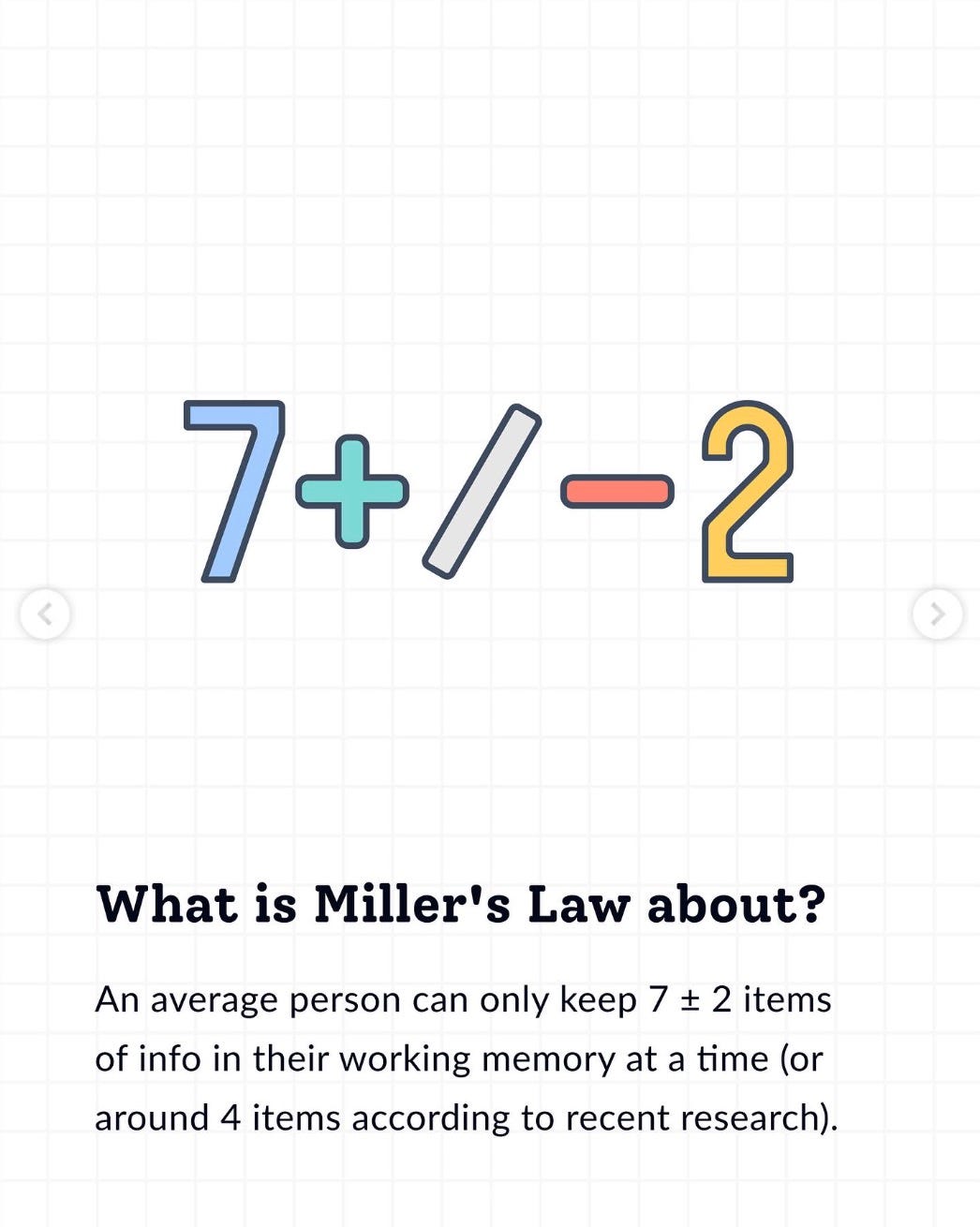
His paper, “The Magical Number Seven, Plus or Minus Two,” argued that our working memory, the mental workspace we use to juggle things in the moment, has a hard ceiling.
That ceiling sits at roughly seven items, give or take two. Call it five on a tired day, nine on a sharp one.
Go past that limit and things fall apart. You drop items, mix them up, or freeze.
Your workspace is simply full.
What Miller’s experiment actually proved
This next part is what makes the dashboard work.
Miller tested people across three different tasks.
First, he read out lists of digits and asked people to repeat them back, stretching the lists longer and longer to find the breaking point.
Second, he had people match signals, like tones of different pitches, to labels they’d memorized.
Third, he showed groups of items and asked people to count them quickly at a glance.
Different senses, different tasks, same ceiling. People handled about seven units before performance collapsed.
Then he noticed something stranger.
What counted as one unit was flexible. The word “seven” is one unit. The single digit 7 is one unit. Even a five letter word is one unit, not five.
Miller’s insight was that memory is limited by the number of chunks, not the raw information.
A chunk is the largest meaningful piece you can recognize as a single thing.
A phone number is the classic example. Ten separate digits will overwhelm you. Group them, 876 then 1234, and suddenly you’re holding two or three chunks instead of ten. Same information, far less strain.
That’s the hinge. If your mind can only hold about seven chunks, then the goal of any good planning system is to squeeze your entire week into seven chunks or fewer.
That’s exactly what a dashboard does.
Turning a psychology paper into a planning system
So we take Miller’s ceiling and we build with it instead of against it.
Your week has hundreds of moving parts. Tasks, appointments, habits, half-formed ideas, things you’re grateful for, things you’re dreading.
You cannot hold all of that.
Nobody can.
A weekly dashboard forces you to crunch that mess down into a handful of meaningful chunks.
The other stuff doesn’t vanish. You just decide in advance which chunks deserve a spot in your limited mental workspace.
Do the hard sorting once, then coast on it all week.
What a dashboard is, and why almost everyone loves them
A dashboard is not a daily view, a weekly calendar, or a monthly grid.
It’s a single spread, sometimes a single page, that shows you what a stretch of time holds at a glance.
Think of a car dashboard.
You don’t read a manual to drive, you glance down and instantly know your speed, your fuel, your warnings.
That’s why people love them.
A weekly dashboard relieves you of the burden of rebuilding your week from memory every morning.
You open one page and the shape of your week is right there, already sorted, already prioritized.
Deciding what to do next stops being a fresh decision and becomes a glance.
The crunch is what does the work, reducing everything to the few things you actually need to see.
The different types of dashboard widgets
Most dashboards are built from four families of widgets. Pick from these like ingredients.
Planning and priorities
This is the core.
A priorities block holds your two or three most important outcomes for the week, the ones tied to real goals, not “take out the trash.”
Keep it to three.
A due this week list catches the smaller running tasks, where the laundry and the trash live.
A schedule at a glance maps appointments and deadlines across the days so you know what’s happening and when.
Data and habit tracking
A habit tracker is binary.
Did you do it or not? Mark a clear symbol for a miss, never leave it blank, because a blank box is ambiguous later.
Data inputs work differently. Instead of yes or no, you record a value, hours slept, hours worked, steps, mood.
I track my focus work hours every week because I run my own business, and those two numbers tell me fast whether I’m heading toward burnout or balance.
Reflection
These widgets hold values and feelings, not hard data.
A gratitude log gives you one line a day on what you’re thankful for.
A captain’s log is more factual, a quick record of what you did and how it felt.
Both keep you grounded. Keep them short, a line or two, since this is dashboard scale, not journal scale.
Notes and capture
A notes block is a scratch pad for anything that lands on your desk mid week, a phone number, a stray idea.
A next week block is a landing spot for things that don’t belong to this week, so when you build your next dashboard you’re pulling from real captured input instead of thin air.
The rule that ties it together: each widget is one chunk.
Choose around five, cap it at seven. If the page makes you wince when you look at it, you’ve added too much.
Trust that feeling.
How to build a dashboard on paper
Start analog. It’s faster to think with a pen and there’s nothing to configure.
Pick a spread. Open your notebook or planner to two facing pages, or one page if you prefer tight.
Choose your chunks. From the four families above, pick five widgets, six at most. For me that’s schedule at a glance, priorities, due this week, a sleep and work tracker, and a notes block.
Draw the frames first. Block out a box for each widget before you write anything inside. This stops the page from turning into a wall of text.
Size by importance. Give priorities and schedule the most room. Trackers and notes can be small.
Fill it the night before or each morning. Spend five minutes loading the week in, then let the page carry it.
That’s the whole method.
Look at it daily, adjust weekly.
The paper version is the best place to learn what you actually use before you build anything fancier.
How to build a dashboard using a Claude live artifact
Once you know your five or six widgets, you can turn the same layout into an interactive version using a Claude live artifact.
An artifact is a working mini app Claude builds and renders right beside the chat, so you get clickable checkboxes and editable fields instead of static ink.
Here’s the flow I use:
Describe your exact widgets. Tell Claude the five or six blocks you settled on with paper. Precision here matters, so name them: “a priorities box with three slots, a Monday to Sunday schedule row, a due this week checklist, a sleep and work hours tracker, and a notes area.”
Ask for a single-page HTML dashboard artifact. Say something like: “Build me a weekly dashboard as an interactive HTML artifact. One screen, no scrolling, clean and minimal.” Claude renders it live so you can see it immediately.
Set the constraint. Tell it to respect the magic number seven, no more than seven widgets, so it doesn’t over build.
Iterate by talking. Ask for checkable boxes, a color for missed habits, bigger priority text, whatever’s off. Each message updates the live artifact in place.
Use it or export it. Keep it open as your week’s home screen, or ask Claude for the code to host it yourself.
Steps
Choose “Artifacts”
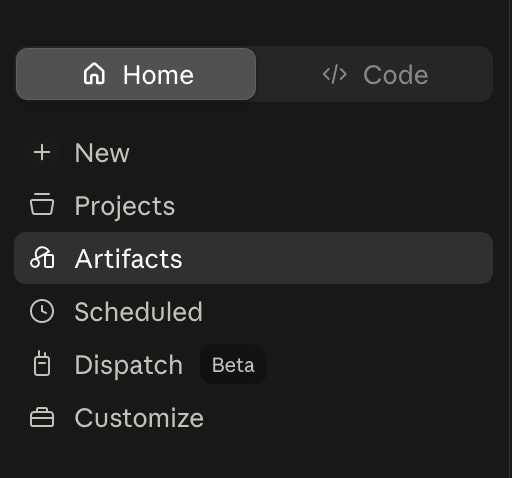
Select “Create Cowork artifact”
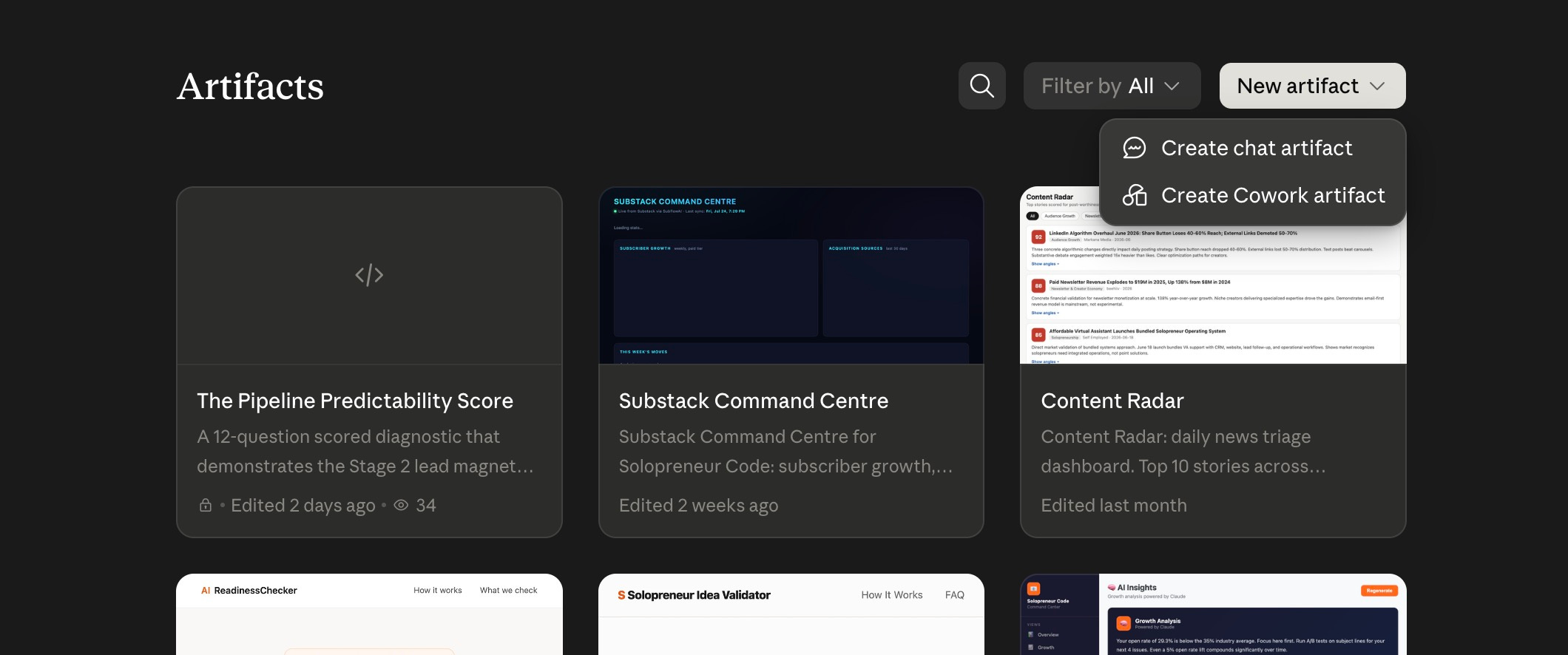
And enter your prompt.
Your ready-to-use prompt
Here’s a single prompt you can paste straight into Claude to build the week-ahead version.
It packs exactly seven widgets, edit accordingly based on your own situation and needs.
Build me a weekly dashboard for the week ahead as an interactive, single-page HTML artifact. One screen, no scrolling, clean and minimal.

Respect the magic number seven and include exactly these seven widgets, no more:

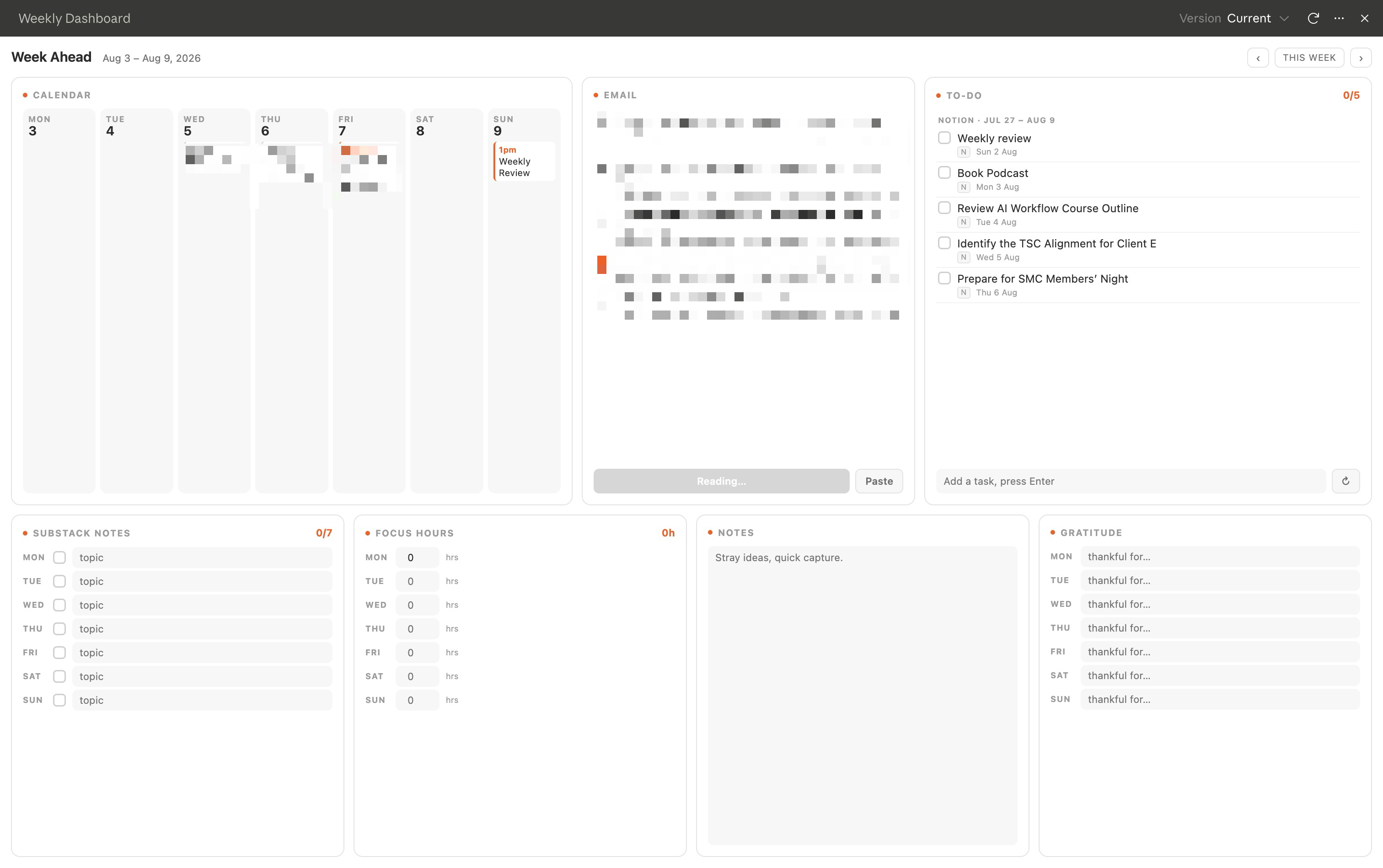
1. Calendar for the week ahead: a Monday to Sunday view showing my appointments and time-bound events.
2. Email planning box: a space where I paste this week's key emails, and you pull out what needs action and turn it into planned tasks for the week ahead.
3. To-do for the week ahead: a checklist with clickable checkboxes.
4. Substack Note tracker: one row per day to log whether I posted a Note and its topic.
5. Focus work hour tracker: log deep-work hours per day with a simple weekly total.
6. Notes area: a free-form scratch pad for stray ideas and quick capture.
7. Gratitude log: one line per day for what I'm thankful for.

Make all checkboxes clickable, keep everything on one screen with a calm, minimal style with orange, white and grey colour theme, and make the layout easy to edit.

After you build it, I'll ask for tweaks like bigger priority text or a color to mark missed days.
Tweak it by talking.
Ask for bigger headers, a color for missed days, or a running total under the focus tracker, and Claude updates the artifact in place.
The advantage over paper is recall and reuse.
You describe the structure once and regenerate a fresh blank dashboard every week in seconds.
Here’s mine:
Every time you open Claude, you re-explain your business from scratch.
Your niche. Your voice. Your offers. Ten minutes lost before it writes a single useful word.
Solopreneur OS for Claude fixes that.
One setup interview. Then 16 skills covering positioning, content, sales pages, launches, weekly reviews that all read your profile before every output.
Validate → Build → Sell → Review.
One system, one voice, one business.

Final thoughts
You were never going to win by remembering harder.
Your working memory tops out around seven chunks, and no amount of willpower moves that ceiling.
A weekly dashboard works because it stops fighting your brain and starts feeding it exactly what it can hold.
Build one this week.
Grab a notebook, pick five widgets, draw the boxes.
Then, if you like it, rebuild it as a Claude artifact you can regenerate everyday.
Either way, you’ll walk into Monday with your week already mapped, and you’ll close Friday without that nagging feeling that something got left behind.
If you want more systems like this, ones built for solopreneurs who’d rather work with their brain than against it, that’s exactly what I write about at Solopreneur Code.

You’re doing everything. But nothing is moving?
You are doing everything. But nothing is moving.
That is not a motivation problem.
Most solopreneurs are learning from everywhere and getting nowhere. Too much information. No clear system connecting effort to results.
You have everything it takes. You just do not have a clear system yet.
That is what paid subscribers get. Every system, playbook, prompt, and template. All inside the Premium Vault.
All for $79/year. That’s $6.58/month.
Upgrade now and unlock the Premium Vault worth thousands of dollars.

The Premium Vault holds the secret behind posts like this one, including the tools and resources I use to build the one-person business I love.

Thanks for reading! Ready for the next step?
Let’s crack the growth equation and build a thriving one-person business on your terms!
Anfernee
I cna say I love it
👍🏻 super useful, will be creating a dashboard now.