
How I Automated Free-to-Paid Conversion on Substack and Sell While I Sleep [By Yana G. Y.]
The blueprint for turning free readers into paid subscribers on autopilot.


Access your FREE Solopreneur Success Hub - your subscribers-only comprehensive command center for building and scaling a successful one-person business.
I created this all-in-one toolkit for building a profitable one-person business, something I wish existed when I first started, and it saves me 20+ hours a week.
Now, it’s yours… FREE!
This is post 4 of 18 in the Solopreneur Systems Series.
Unlike the other posts from this series, I’ve decided to invite Yana G.Y. to share her secrets of how she converts her subscribers, and recently hitting 700+ paid subscribers in early June.
Trust me, the entire setup is just brilliant! Check it out!
For this post, both Free and Paid subscribers will get the full setup guide, tool recommendations, and maintenance schedule for every system.
Section 1: What the free-to-paid conversion system is
Most writers run a paid newsletter like writing hobby. Write things behind the paywall and hope someone will pay.
Rarely works.
Some writers understand the need of sales but run it like a string of launches.
They write a promo email. They talk about the offer for a few days. A few people upgrade. Then they go quiet and get back to writing.
A month later, sales have flatlined. So they write another promo. Same spike, same drop, same silence.
I know this pattern because I lived it. By November 2024 I’d hit 100 paying subscribers with a few sales emails a month. Black Friday pushed me to around 120. Then December came, I rested after the big push, and conversions fell to almost nothing.
With a paid newsletter you’re carrying three jobs at once:
growing free subscribers,
converting them to paid, and
delivering enough that paid subscribers stay.
Each one needs constant attention. The moment you stop feeding one of them, your business starts dying.
A free-to-paid conversion system takes the middle job off your plate.
It’s the set of automated email sequences that pull every new free subscriber out of Substack, educate them about what you do, build trust, and sell your paid tier or products. On autopilot. While you write. Or sleep.
What the system actually does
It covers five things:
Import and tagging. It gets every new subscriber out of Substack and into an email tool that can actually run automations, tagged as free, paid, founding, or unsubscribed. I use Kit for that.
Nurture. A 10-day nurture sequence that educates new subscribers and walks them through the best of your paid content.
Sell. A 10-day sales sequence that converts them through value and proof, not pressure.
Remarket. A shorter 5-day sequence for people who clicked your offer but didn’t buy.
Clean up. Rules that remove buyers and unsubscribers so you never sell to the wrong person.
What it looks like when it’s working
A reader subscribes for free. Within the hour, they’re imported and tagged. The next morning they get email 1 of a 10-day nurture sequence.
It has three jobs:
get them to know your paid content,
get them to know you and trust you,
prepare them for the next phase - upgrade.
That’s the job of the next 10 days emails.
I use a special discount code, so I can track where people come from.
Some upgrade at standard price available on the subscribe page. That’s what the nurturing sequence does.
Some take the discount. That’s what the sales sequence does.
And some reply to tell me exactly what’s holding them back. I ask them in one of the emails sent to those who clicked and didn’t buy.
All this happens when I write my next paid post. And I just got another Stripe notification while writing this.
That’s the system running.
What are the tools
Here’s the entire stack:
Substack,
a Google email,
a few Gmail filters,
Make.com, and
Kit.
I pay for Kit and for Make.com.
I also pay for Google workspace, but you don’t have to for the needs of this system.
What makes it work is the emails structure and the writing inside it. The tools just move people from one place to the next.
How this works
The big marketing books say it takes about 3 months, or about 20 touch points, before a free subscriber becomes a buyer.
I analyzed my own numbers after building this. For me it’s closer to 1 to 1.5 months.
67% of my paid members upgrade within the 1st one month. That number varies from newsletter to newsletter and mine is so extreme because of this system.
The automation is what compresses the timeline, because it gives every new subscriber a reason to convert instead of waiting for them to dig through my archive (they never do).
Section 2: How I set mine up
My actual setup
I launched my Substack in June 2024. By September I had exactly 20 paying subscribers, and almost all of them came with me from Medium, not from Substack itself.
On 1 September 2024, I went all in.
For the first 2 to 3 months I grew with no promos at all. I just talked about what I had in my paid tier, and people joined. This is real, and it’s worth knowing: in the very beginning you can grow without a single discount or sales email.
Provided that your paid membership is strong.
But then it stops. If you don’t keep talking about your paid tier, it simply stops selling. That’s what happened to me right after September.
So I started sending a few promo emails a month. I’d priced low on purpose, $36/year, because my goal was to become a Bestseller fast. With just those few sales emails, I hit 100 paying subscribers by November and about 120 after Black Friday.
Then December died, the overwhelm hit me, and I knew I couldn’t keep selling by hand every month on top of a full-time job.
I had to automate this.
Substack doesn’t have an API, so there’s no official way to move subscribers anywhere. But I found a workaround: auto-import every new subscriber into Kit using Substack’s email notifications, Gmail filters, and Make.com.
I designed it over the new year and built it in January. The sequences run about 30 days, so it took weeks before anything showed. February is when it kicked in (the same month I launched my viral-notes GPT and talked about it everywhere).
Today I’m at 700+ paying subscribers. This one automation brought me about half of them plus some founding-tier members, with an unsubscribe rate I’m very happy with.
What I tried first, and why I changed it
I tried doing it all manually. A promo every month.
It felt productive. And I’ll be honest, the thrill of watching money land in your account is real motivation. I won’t pretend otherwise.
The cost was that it pulled me off the work I actually care about: writing, and delivering for the subscribers who already paid me. I’ve spent almost 20 years in marketing and sales, and even I don’t enjoy selling directly every single month.
So I made a decision. Automate the selling. Put my energy into the paid content.
That’s when my conversions got consistent.
The data also made one thing obvious. The automation alone wasn’t enough. February only worked because I also shipped a new product and kept showing up. The sequences sell. Fresh paid content and actually engaging with people are what make the sequences convert.
But then in March I focused on building the Quest and skipped a paid post every now and then. And so the sales decreased.
So this is key: in order for this conversion system to work, you need to also keep pushing fresh paid content.
What I never changed
For the first 10 days I use a 10-Day free crash course. It solves one big problem for my audience and because it’s a “course” I use it also as a lead magnet.
This works so well, for so long that it becomes evergreen.
The only thing I change inside of it is the links I point people to - I make sure I add fresh new links, so that people don’t get the impression that it’s outdated.
What the system produces
Consistent growth of paid subscribers
Conversion window cut to roughly 1 to 1.5 months
A paid newsletter that now gives me a stable income of about $5,000/month
Where AI fits
I don’t write each sequence from scratch anymore.
I give Claude my own content as a source, plus a short brief: what I sell, who it’s for, their fears and frustrations, the outcome I deliver, and how I’m different. Then I ask it to build sequences in my structure for the new product or offer.
The rule I use is simple: AI drafts, I decide. Always.
I just released a Claude skill that writes the actual emails for you, in the same structure that makes people buy.
I use this so I can spin up a full sequence for any product in minutes. Not just a paid subscription.
Section 3: How to build yours, the complete guide
Part A: Readiness check
Before you build anything, answer these few questions. They’re not comfortable. And they’re not meant to be.
Do you have a paid tier or a product to sell? If you only have a free newsletter and nothing to buy, build that first. An automation with nothing behind it is wasted energy.
Can you point to 3 to 5 of your best paid posts in each content pillar, the ones that give someone a real reason to upgrade? If you run a free newsletter, can you point to 10 strong posts that connect to a product you sell? Because yes, this builds trust.
Are you keeping conversions alive by running a manual promo every month? If yes, this system will help automate it.
If you went quiet for 60 days, would your paid sales drop close to zero?
If one of those made you pause, you already know where your gap is.
The rest of this guide closes it. It covers the full build for all 5 components, a starter workflow, my exact tool stack setup, the most common mistakes, a maintenance schedule, and what my real numbers looked like.
Part B: The build
Work through this in order the first time. After that, the maintenance schedule at the end tells you what to revisit and when.
Component 1: Import and tag your subscribers
Step 1: Set up a Google email as your main Substack email. When I set this up, this automation didn’t work with a standard free gmail.com address, so I had to use a paid workspace email, but that is no longer valid.
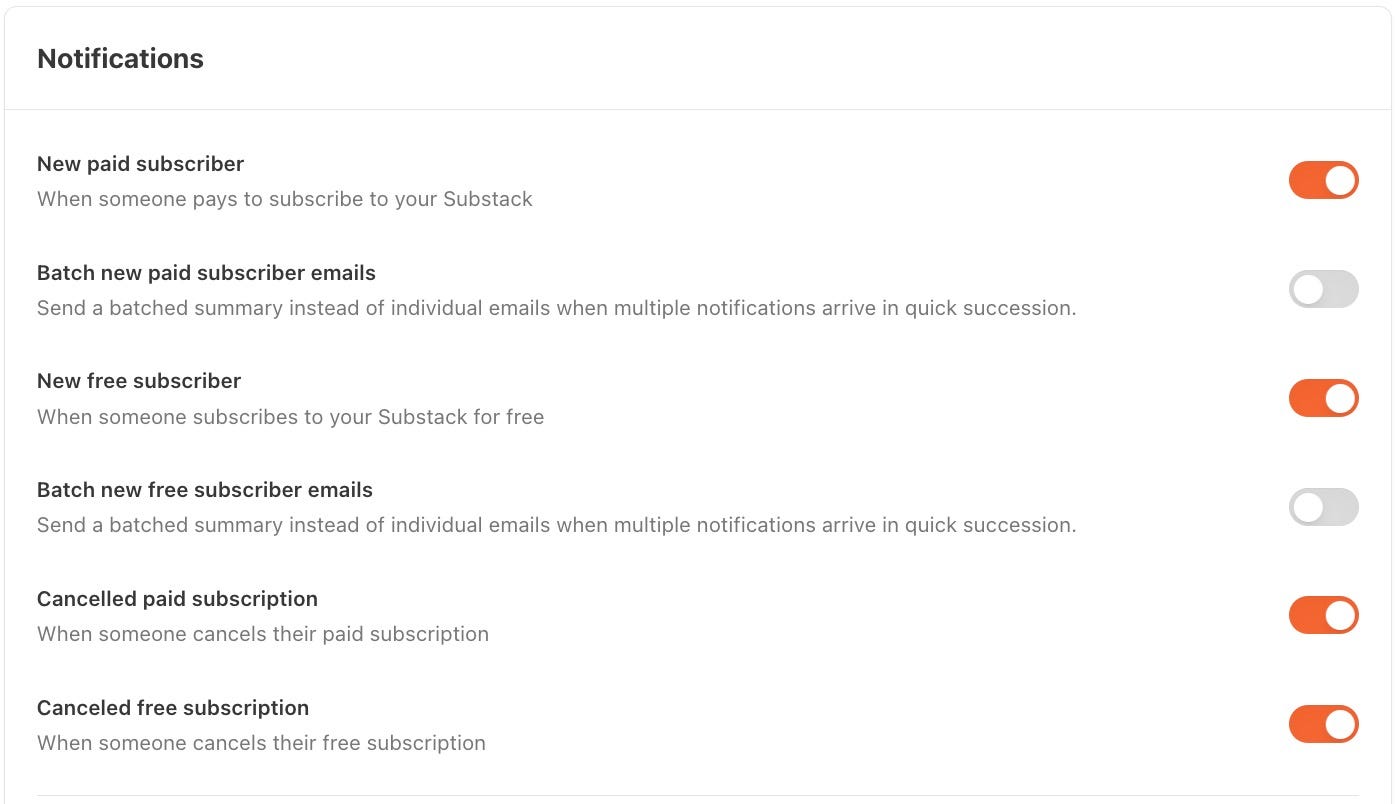
Step 2: Enable all 4 Substack notifications. In your settings, turn on new free subscriber, new paid subscriber, canceled paid subscriber, and canceled free subscriber. All four. This is what triggers everything downstream.
Step 3: Create 4 Gmail filters. Got to your gmail on a web browser and set 4 filters - one per notification. Each filter catches the email from Substack by its subject line and applies a label (I use labels like Substack Free, Substack Paid, Unpaid, and Email Disabled). The labels are how Make.com knows which folder to read in my Gmail.
Step 4: Set up 4 Make.com scenarios. Ok, here it gets a bit techy, but it’s not much. Set up the scenarios like this:
New free subscription - a gmail node looking for new emails in the filter you made in your gmail + a Kit node importing this email to Kit (I use the “Assign to a form” option) and tagging it as a free subscriber. You have to have the tags and the form predefined in Kit. Use the “reply-to” filed to get the actual email address from the Gmail.
New paid subscription - same as above, but using the paid subscriber filter and a different tag in Kit.
Email disabled - when a free subscriber unsubscribes. Here it gets tricky - the only way to get the email address is to read the body of the email. Problem is it’s too messy, you need a regex code. I use this code within a text parser node (the match pattern one) placed between the gmail and the Kit node: Email:\s*([a-zA-Z0-9_.+-]+@[a-zA-Z0-9-]+\.[a-zA-Z0-9-.]+)
Unsubscription - when a paid subscriber stops paying. Same setup to the email disabled one, just different tag in Kit.
Decision point: On the free Make.com plan, scenarios run every 15 minutes. If you get a lot of new subscribers, you’ll run out of operations fast. The paid plan is cheap and I’d upgrade. I run mine every 1 hour and mark imported emails as read, so if my new-subscriber emails ever stop getting marked read, I know something broke.
If you have a founding tier, you need another scenario, similar to the one in point 1.
Component 2: Set up your tags and segments in Kit
Step 1: Create your core tags. The non-negotiable ones are: Substack free, Substack paid, Unpaid from Substack, unsubscribed from Substack, in-sequence, unsubscribed from Kit, and a “clicked the offer” tag with an automated link trigger. Some of these tags you’ll use in Make in the setup from above.
Step 2: Connect Kit to Make and assign subscribers to a form. Grab your Kit API key from the developer tab, connect it in Make, and point the import at a form. It can be a plain default form. One thing that matters: on the form’s incentive settings, I turn off the confirmation email so that people don’t get annoying confirmation emails after they already subscribed. Your Substack subscribers already opted in, so don’t make them confirm again.
Decision point: Kit moved sequences and automation behind a paid plan, so you can’t start free. You can build and test on free, but to run the full automation you’ll likely need to upgrade. The 100 paid subscribers this brought me cover that cost many times over.
Component 3: The nurture sequence
This is the welcome sequence, but I build and name it as a course. “Grow your first 1,000 subscribers in 15 minutes a day” pulls far more sign-ups than “welcome sequence” ever would, and it raises the perceived value of what people are getting.
Step 1: Write email 1 as your foundation. Your story (how you got your result), what makes you different, a piece of real data or proof, a description of the gift they’re about to get, and a poll asking where they are on their journey. Feed both sides of the brain: emotional with story, analytical with proof. That mix is the single most persuasive thing in my writing.
Step 2: Write emails 2 to 10, one topic each. Each email teaches something real and links to the paid content that solves the same problem. Mine cover free vs paid newsletters, finding your niche, defining your audience, building your offer, growing your first 1,000 subscribers, conversion, and retention. One clear call to action per email. Resist the urge to add a second link.
Step 3: Make the last email the only hard sell. It carries a real subscriber win (mine quotes a paid member, who shared their result in my chat) and transitions into the sales sequence.
Decision point: Predominantly link to paid content here, not free. The point is to show people what’s behind the paywall so they have a reason to upgrade. Pick fresh posts, not something from last year. Update them regularly. I do that every 3 months.
Component 4: The sales sequence (10 days, one link)
This is where you actually sell. Less teaching, more proof and reasons to upgrade.
Step 1: Use one link only. Every email points to a single subscription or offer page. No links to free or paid content, no detours. I run a special offer here to make it more appealing and to be able to track.
Step 2: Use a link trigger, not a button. In Kit, create a rule that tags everyone who clicks your offer link. Use that trigger in place of a plain link in every email. This way you can track who clicked and assign a tag - you need it to filter the ones who clicked and didn’t buy in the last 5 emails.
Step 3: Write 10 emails from 10 angles. Mine include fear of missing the moment, social proof (400+ paying subscribers), an easy path to the outcome, a money-back guarantee, objection handling (not ready, no time, not worth it), a sneak peek (I give free access to one paywalled post as a trial), the full value of my tools, last chance, and a final call. If you can’t think of 10 angles, give your AI your offer and audience and ask for 10. Or use my Claude skill.
Decision point: Only sell what you genuinely believe helps people. That belief is what lets you sell without feeling sleazy. And don’t fear repetition. Most people read 2 or 3 of these emails, not all 10, so repeating your core points is good practice. That is the biggest mistake I see writers make.
Component 5: The remarketing sequence (5 days) and clean-up
Step 1: Catch the clickers. Everyone tagged “clicked the offer” who didn’t buy goes into a 5-email follow-up. Keep these emails short, personal, and direct, as if you’re texting a friend. Mine go: what’s holding you back, I’m not selling you something you can’t do, still thinking about it, soft urgency, last reminder. Then I let it go completely.
Step 2: Add your clean-up rules. At the end of the automation, move buyers out so you stop selling them what they already own. This will also make sure that the last 5 day sequence goes only to clickers who didn’t buy (because if the bought, they will be moved down). Remove anyone who unsubscribed from Kit (tag them when they click your unsubscribe-preference link). Remove anyone who unsubscribed from Substack, since that’s where your paid tier lives.
Step 3: Chain it if you sell more. If you have a product portfolio, move buyers of one product into the automation for the next. This is how you turn a single conversion engine into an upsell engine.
Starter workflow you can copy right now
This is the minimum version in case you need one:
Google email set as your main Substack address
All 4 Substack notifications on
4 Gmail filters with labels
4 Make.com scenarios scheduled
7 core tags in Kit
1 nurture sequence (10 emails)
1 sales sequence (10 emails, one link, link trigger)
1 remarketing sequence (5 emails)
Clean-up rules at the end
Tool recommendations
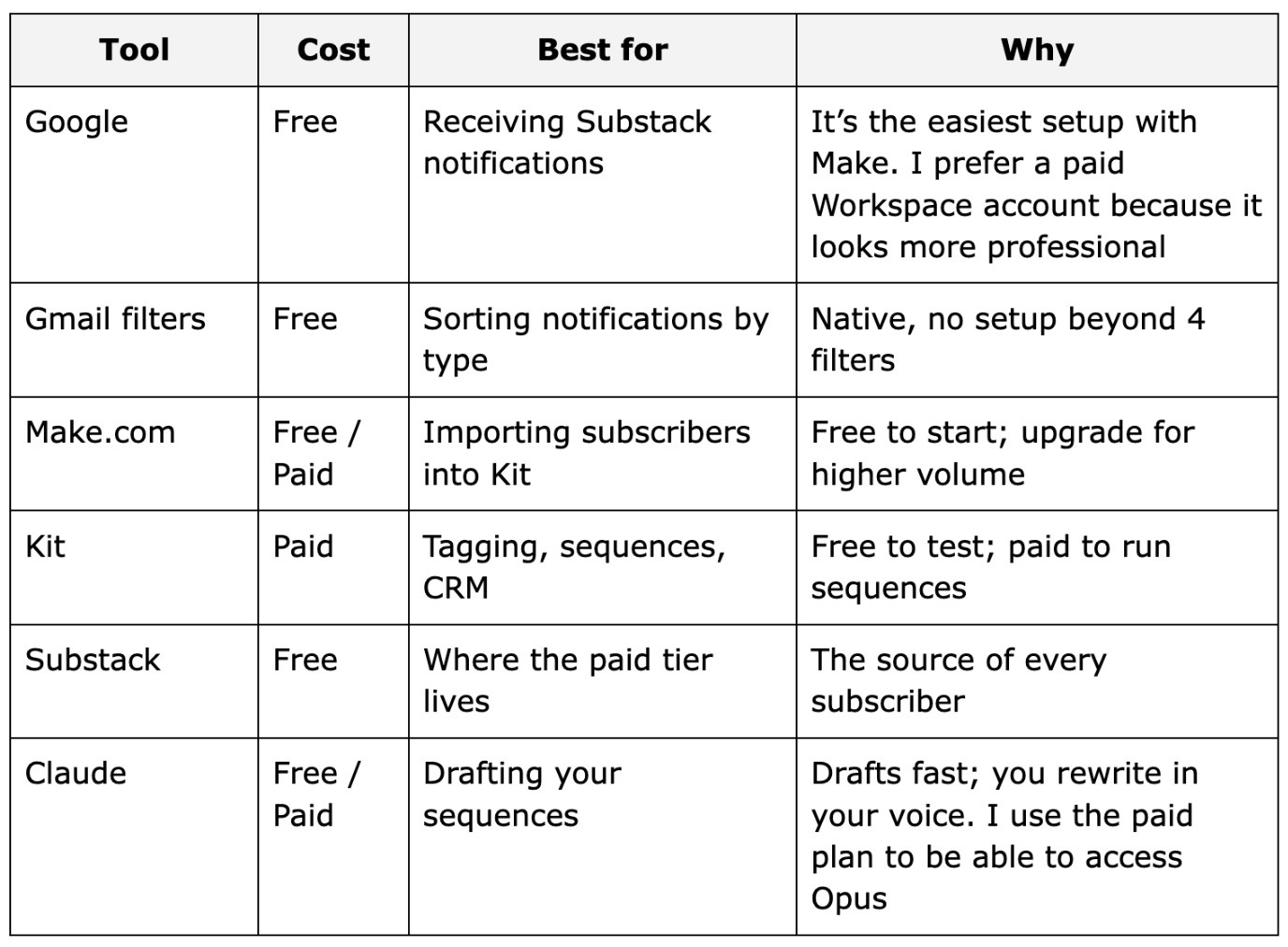
My pick: Gmail and Make do the importing. Kit does the tagging, CRM, and sending. AI drafts the emails, I decide.
Common mistakes
Mistake 1: Building the automation before you have something worth buying. An engine with nothing behind it wastes your time and your subscribers’ attention. Build the paid tier or product first, then automate the selling. If you already have subscribers you can add them manually to the automation when you enable it.
Mistake 2: Treating it as set and forget. This is the one that gets people. The automation sells, but it dies if you stop delivering. Keep shipping fresh paid content, answer comments, talk with your people.
Mistake 3: More than one call to action per email. Two links split attention and lower conversions. I break this rule sometimes and the data punishes me for it. One message, one action.
Mistake 4: Sending too few emails. Most people hesitate sending daily emails. Some come to me with the excuse “my niche is different”. Truth is people will unsubscribe. They will send you nasty emails. Let them. This is also your filter - you need your list to be made of buyers, not free loaders.
Mistake 5: Selling to people who already bought. Without clean-up rules, your automation keeps pitching the paid tier to paid subscribers. It’s annoying and it’s avoidable. Move buyers out the moment they convert.
Maintenance schedule
Weekly (inside your existing review):
Update any call to action or benefit that changed (I update mine constantly, since I keep adding to the paid tier)
Check that imports are still flowing (are new-subscriber emails getting marked read?)
Monthly:
Read the open and click reports. My first nurture email runs about 33.7% open and 4% click, and anything above 1% on a soft-sell automation is great.
Note which topics get the most clicks. Those are what your audience cares about most.
Quarterly:
Refresh stale links in the sequences with newer posts
Review your offer and discount
Build the next product automation and chain it on
A real example: what the numbers told me
When I read the reports on the running automation, the first email sat at 33.7% open and 4% click across the roughly 10,000 subscribers it had reached by then (I feed it some paid traffic too).
The topics my free subscribers clicked most were free vs paid newsletters, finding your niche, building your offer, and growing your first 1,000 subscribers.
When you look closely, you’ll notice something. Those are the titles of my products, and the core of the QUEST. That’s what sells.
That’s how you make data-driven decisions without lifting a finger. You send the emails, you read the clicks, you build the products people already told you they want, then you sell them. Simple as that.
If you like this post, you’ll also like the other post from the Solopreneur Systems Series.

You’re doing everything. But nothing is moving?
You are doing everything. But nothing is moving.
That is not a motivation problem.
Most solopreneurs are learning from everywhere and getting nowhere. Too much information. No clear system connecting effort to results.
You have everything it takes. You just do not have a clear system yet.
That is what paid subscribers get. Every system, playbook, prompt, and template. All inside the Premium Vault.
All for $79/year. That’s $6.58/month.
Upgrade now and unlock the Premium Vault.


Thanks for reading! Ready for the next step?
Let’s crack the growth equation and build a thriving one-person business on your terms!
Anfernee
 | A guest post by
|
Wow! Thanks for sharing
This is amazing!